When I first started working for Borland, back in 1990, I didn’t know anything about regular expressions. In fact, I don’t think I’d even heard of GREP (a text search tool provided with Borland compilers) much less used it. Eventually I did discover GREP, but I only used it for simple plain text searching. Eventually someone introduced me to the use of .* and simple character classes like [a-z0-9]. I was able to get by on that small subset of regular expressions with GREP for the next 7 years.
Then, only a few years ago, I discovered Perl (Perl is an acronym for Practical Extraction and Reporting Language). One of my co-workers, an avid Unix fanatic, solved a problem in the build process of one of our products by using a piece of Perl code. Later he taught an introductory class on Perl to the rest of us who were unfamiliar with it. Since Perl is an interpreted languag, I have to admit that I was quite skeptical of Perl’s usefulness (although recent versions of Perl now compile to p-code). My background was in various flavors of assembly and C, followed by C++. I was not prepared to admit that a simple, interpreted “script” could be any more useful than a DOS batch file. As it turns out, I wrong in that assessment. I found Perl so powerful that, after I learned enough about it to be comfortable, I replaced numerous batch files and several custom C programs with Perl scripts. Those scripts are now vastly more powerful than their original versions ever were.
Perl’s power stems from several key features, the most important of which are its support of regular expressions. Perl is a scripting language and the purpose of supporting regular expressions is to allow the script to interact with the data it can search for. Considering this, it makes sense that there would be interesting features built into Perl for doing this. For example, Perl allows you to search a string for a regular expression pattern (regexp) that contains groups. The technical term is called “capturing sub-expressions” and it refers to the groups of parentheses in the expression. Take this regexp, for example:
^My (cat|dog) has (fleas|paws)$
This expression will match all of the following four strings:
My cat has fleas
My dog has fleas
My cat has paws
My dog has paws
Now if you wanted the script to do something different depending on the various words that actually were matched, you can make use of Perl's grouping variables. In this case the group $1 would contain the matched string from the first group (either cat or dog) and $2 from the second group (either fleas or paws). This way the script could do one complex regexp search and then continue on and use the variables that contain the grouping strings.
C++Builder 4.0 added a new collection of routines to the RTL that implement Perl’s dialect of regular expressions. These are the Perl Compatible Regular Expression (PCRE) routines. Their declarations and supporting constants can be found in PCRE.H. The functions were written by Phillip Hazel of Cambridge University and released into the public domain.
The functions in PCRE.H are pcre_compile(), pcre_exec(), pcre_maketables(), pcre_info(), pcre_study(), and pcre_version(). These C-based routines support a very high percentage of the Perl syntax for regular expressions. However, they are a bit tedious to work with directly. The pattern to be searched for must first be compiled into an efficient internal format, and then the target string or strings in which to search are processed with that compiled pattern. Successful matches result in all the captured sub-expressions being made available as two integer offsets into the target string for each match (the beginning offset and the ending offset of the sub-string). The address of an array of integers that the user allocates and the length of that array are parameters passed into the PCRE routine in order for the sub-expression offsets to be returned.
This may sound easy, but in actuality it’s a bit more complex than that. In order for the PCRE routines to be thread safe, they don’t use any global variables. And in the interest of speed, they do not dynamically allocate memory for use as temporary space during the matching process. As such, the user must allocate extra elements in the array of integers and that extra memory is used internally as temporary storage.
The formula for determining the proper size of the array is something like (x+1)*3, where x is the number of captured sub-expressions that you expect to use. The +1 part of the equation is to make room for a 0th element that contains the entire string that was matched even if there are no parentheses around the entire pattern. The *3 part of the equation makes room for the two elements (start and end) that describe where that part of the sub-expression is in the target string, and the extra storage that the PCRE routines can use internally.
To complicate things even more, there are various flags that can be specified at either the pattern compile time or the pattern usage time to modify how the PCRE routines behave. For example, there is a flag that specifies whether the search should be case sensitive or not. The end result is that using these routines can be tedious and complicated.
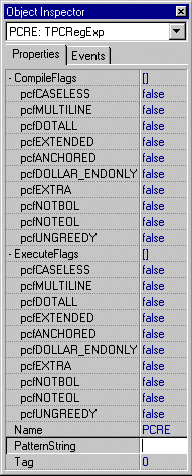
C++Builder’s component architecture makes the PCRE routines quite easy to use. I’ve written a component called TPCRegExp that takes care of the tedious work involved in using regular expressions (see Figure
A). The component publishes two sets called CompileFlags and ExecuteFlags. These sets are used to set the various PCRE option flags for the compile of the pattern and the execution of that pattern (searching for a match). There is also a string property called PatternString, which holds the regular expression text.
Figure A
The Object Inspector showing the published properties of the TPCRegExp component.
To use the component, simply set any of the flags as desired, put the regular expression into the PatternString property, and call the Compile() function. The Compile() function will return true or false indicating success or failure with the pattern. If there were errors, the offending offset in the pattern and an error message string are returned as reference parameters. Here is the declaration for the Compile() function:
bool Compile(
  AnsiString &ErrorString,
  int &ErrorOffset);
Now the pattern is ready to be executed against a target string. This is done by calling the Execute() function, passing the target string and an optional maximum length of the string. The Execute() function is declared as follows:
bool Execute(
  const char *subject, int len = 0);
As you can see, the len parameter has a default value of 0. When len is 0, the entire length of the target string is searched. The return value will indicate whether or not there were any successful matches. The entire match string can then be retrieved via the EntireMatch property. If sub-expressions are expected, then they will be converted into AnsiStrings and added into the CaptureList property, which is a TStringList.
In order to show that my TPCRegExp component worked correctly, I wrote a small test program. Little by little I added things until it started getting to be more than just a test program. Eventually it seemed like this test program might make a useful utility, so I polished it up a bit and have included it here for you to use and/or modify. It’s called VGREP.EXE and it is a visual GREP tool (see Figure
B). In its present form it doesn’t really have any advantages over the normal command line versions of GREP, but I do have some plans for it (possibly to be presented in future articles) that will make it much more useful.
Figure B
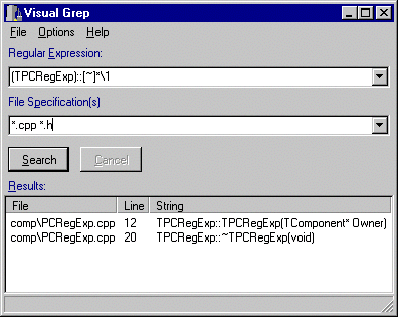
The Visual GREP program uses a regular expression pattern to find all constructors and destructors of the TPCRegExp class.
VGREP is pretty easy to use. Simply enter a regular expression and the list of file specifications (including wild cards) to search. Select any options from the Options Menu, such as case insensitivity or subdirectory search. Press the Search button and the results, if any, will appear in the “Results” ListView. The results are separated into the file name (and directory if necessary), line number, and the entire matching string.
In this article I introduced you to regular expressions and Perl. I also talked about the PCRE routines that come with C++Builder and how they are a bit cumbersome to use. Then I showed you my solution to this in the form of the TPCRegExp component. Finally, I explained the talked about the initial version of VGREP as an example of how to use the TPCRegExp component.
I have barely scratched the surface of what can be done with regular expressions. If you are interested in finding out more about Perl you can visit the major Perl web sites at www.perl.com and www.perl.org. Or, if you prefer printed material, I highly recommend the O’Reilly book “Mastering Regular Expressions,” by Jeffrey Friedl. Look for two owls on the front cover) .
The entire source code for VGREP and the TPCRegExp component can be downloaded from the Bridges Publishing Web site at www.bridgespublishing.com.