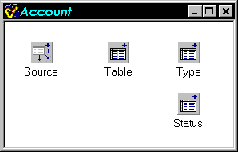
Data modules are a specialized type of form descended from TDataModule. Normally, you place components that descend from TDataSet and TDataSource on a data module (TTable and TQuery, for example), but data modules can contain any non-visual component.
Data modules represent one of the most underutilized aspects of the VCL. This is not surprising when you consider that only a few lines are dedicated to them in the C++Builder Developer’s Guide. In my first year of working with C++Builder, I completely ignored data modules, piling datasets and data sources on my forms as needed. I would guess that most developers initially take that same approach. In the last few years, however, I have discovered a powerful set of design patterns emerging from increased use of data modules. I will explain those design patterns in this article.
A basic data module is a container for datasource components such as TTable and TQuery, and for their associated TDataSources. It provides a convenient place to put datasets that would otherwise clutter a user interface form at design time.
The basic data module, though, has a more important purpose. It allows you to decouple your data from the view of the data provided by the user interface. This means that the same data module can be used by multiple user interfaces, or to perform processing without the involvement of a user interface (for instance in an NT server or a non-visual DCOM, Web, or CORBA server).
Within the basic data module, event handlers associated with datasets and data sources can be used to enforce consistency (preventing deletion of data from a table when the ID of the row to be deleted is referenced from a row in another table), to constrain the availability of data to the user interface (by applying a filter to one dataset based on some field in the current row of another dataset), or to trigger changes to data in other datasets (to update a summary dataset after a change to a detail dataset, for example). And, of course, custom datasets can be developed to provide dataset-like access to non-dataset sources of data (real time data monitors or processes communicating with sockets from remote systems, for example).
Once you make the transition to the basic data module, you need to follow certain rules to gain the greatest benefits from the approach.
First, never access elements of any user interface from a data module. Doing so couples the data module to the specific form and prevents it from being used with some other form or for use without a form. You can, and should, access elements of related data modules as needed, but be aware that this couples those data modules and requires that they be used together in any project
Second, try to connect user interfaces to the data module mostly through data aware controls attached to data sources. If need be, create new data aware controls for your user interface. For instance, if you need a record count label, create a data-aware descendant of TLabel that interrogates the dataset of its data source for the record count when a data change event occurs. Don’t have the form programmatically interrogate a data module dataset and definitely don’t have a data source in the data module reference a label on a form to update it with the current record count. If you need user interface related processing associated with a TDataSource event (such as OnDataChange), either create a data aware non-visual control for the form and associate it with the data source, or add a data source to the form and attach it to the dataset in the data module.
Third, keep “business rules” and processing logic in the data module. Only methods highly specific to a user interface should be placed in a form. This maximizes the reusability of the data module and keeps processing close to the data, where anyone maintaining your code will expect to find it.
Finally, name your data module, data sources, and datasets carefully and consistently. This helps ensure that event handlers and user interface logic are easily readable and traceable to specific data modules and datasets. Use persistent fields on your datasets to minimize the need for the user interface to know about the internal structure of the data module.
A data module should be more than a pile of datasets and data sources needed by your current application. Properly composed, a basic data module is a cohesive unit of related datasets that reflects your database design. This makes it easier for others to understand how your system relates to the underlying database schema should they need to maintain your code.
Take a typical account/order relationship in a database, for example. The two data modules shown in Figure A illustrate how you might implement this relationship.
Figure A
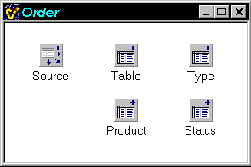
An account/order database might be implemented with data modules like these.
Notice how the data module controls the scope of names so that you can reference both Order->Table and Account->Table. This kind of standard naming makes it easier for a programmer maintaining your code to understand a data module and its logic.
Here again, there are some rules that should be followed to make this work. The first rule is that Table and Source are the dataset and data source for the primary table and are used in any user interface that edits the table.
The second rule is that the domain tables should have an associated data source if they can make an appearance in the user interface (for editing).
There are few data modules that do not need to reference data from some other data module. For instance, an order references its account for information like account name and address. Often this information is accessed via persistent lookup fields (like Order->TableAccountName).
Such a lookup field can reference the other data module’s data sets. The advantage to this is that the other data module retains responsibility for its data. However, the disadvantage is the coupling between the two data modules, which means that the Order data module cannot be used in a project without also including the Account data module.
You may be tempted to include a data set in the Order data module to represent the account table for the lookup fields. Doing so, however, eliminates the coupling at the cost of preventing the application of appropriate business rules to the data set, since only the Account data module should contain code for those business rules. In some cases that may not be a problem, but when it is, there is another way to approach the issue; form inheritance.
Form inheritance allows you to create a descendant of your data module and to augment the ancestor class with enhanced event handlers, additional components, or changes to the properties of inherited components. To use form inheritance, first create the base data module. Next, right click on the data module and select “Add To Repository” from the context menu. Give the data module a name and put it on a new page in the Object Repository (I use the data module name itself for the page name). Now choose File|New from the main menu and inherit a new data module from the data module you just added to the repository. Add components or make other changes in the inherited data module as needed. If you create an event handler that overrides a base class event handler, don’t forget to call that inherited event handler where appropriate. This can be used to deal with the lookup problem in an especially elegant way. Figure B shows an inheritance tree of data modules that deals with the lookup problem.
Figure B
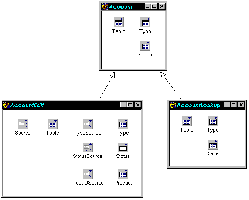
Form inheritance can be used to solve programming problems.
Note that the base class does not have any data sources. The data sources are only introduced in the “Edit” leaf of the inheritance tree because the lookup leg will generally not be used in a user interface. That may not always be true, though. For instance, TDBLookupCombos should be linked to data sources in the lookup data module. This may cause you to decide to place data sources in the base class as the need arises to have them available for both edit and lookup, rather than introducing them in the descendant classes.
At any rate, the answer to the question posed in the previous section is that the Order data module lookup fields references the datasets in the lookup data module. Further, any Locate() operations should also use the lookup data module.
What about iterating through a table? Generally, you should be able to use the lookup data module for this purpose, unless you intend to edit the data as part of the iteration. In that case, the edit data module should be used to ensure that integrity checks and business rules are maintained. In a few cases, you may need to derive a third leaf class to be used for iteration.
Note that the leaf classes are the actual instances used in a project. By the nature of form inheritance, only one instance of a non-leaf class can be present in a project at design time.
Some developers may be tempted to instantiate multiple copies of what should be a base class data module at runtime to provide a lookup table. However, the advantage of the scheme described here is precisely that it allows design time inspection and modification of the various data modules, and a thoughtful partitioning of function between them. For instance, the base data module implements tables, fields, and handlers common to both editing and lookup. The edit data module adds components and fields, and overrides handlers to produce edit specific behavior. If a different behavior is needed for the lookup module, that can be implemented separately.
One last note: Multiple cursors into the same physical table require a refresh of all cursors when an insert or update is performed on one. For TTable descendants a call to Refresh() is sufficient. For TQuery descendants, the query must be closed and then opened again. Usually, I define a TQuery descendant which implements Refresh() in that way, since the Refresh() method has no effect for TQuery. Effectively supporting refreshes at runtime across multiple cursors generally requires you to find which tables and queries in the Sessions->Databases->Database->DataSets list reference the physical table just updated. The method for doing so is beyond the scope of this article, but is discussed at http://www.temporaldoorway.com/programming/cbuilder/databaseandbde/scanningtorefresh.htm
You may be designing a system where you are not sure what dataset type may be used to connect to the database, or where one version of the system may use a TTable attachment to a desktop data base, another version may use a TQuery to work with a client server data base, and a third version may use client datasets to work with a multi-tier system. You can exploit form inheritance to solve this particular problem.
The base class data module should contain only data sources. The user interface should connect to the base class data sources. Programmatic references to the datasets from other data modules or the user interface should be of the form:
DataModule->DataSource->DataSetPersistent fields for the datasets that will be added should be included in the class definition of the base class data module. This allows the user interface to reference the base class instances of those fields.
Each descendant of the data module then adds the actual dataset components, associates the data sources with the datasets, and creates the persistent field instances from the actual datasets programmatically. The descendent data module also initializes the base class global variable for the data module with this. This can also be useful when some descendants may use non-BDE dataset components, as well as with different types of BDE dataset components, as shown in Figure C.
Figure C
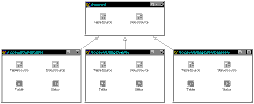
Inheritance can be used to create a data module that can obtain data from varied data sources.
Note that a descendant of the base class can even make the decision about which type of dataset to establish at runtime, and can dynamically create and link datasets of the desired type based on user input, a registry setting, or some other indicator.
Note also that this can lead to “uneven form inheritance” which requires a special fix in your program source, as documented in http://www.temporaldoorway.com/programming/cbuilder/advancedissue/unevenforminheritance.htm
Most C++ Builder developers have heard that adding properties to data modules is difficult. Indeed, it seems to require producing a Wizard and a Form Designer, something that is not directly productive for working developers looking to complete a project. Fortunately, there is a much simpler and better way—components.
Generally speaking, components encapsulate both data and behavior, offering design time properties that affect behavior. However, you can use a non-visual component to add design time properties to data modules.
To illustrate, I have created a component called SamplePropertyComponent. The header for this component is shown in Listing A. As you can see, this component is quite simple. It also allows use of the component’s properties from within the data module with this code (assuming I gave the component a name of Property):
TDataSet *CurrentTable =
  Property->PrimaryTable;
The component can be referenced from outside the data module like this:
TDataSet *CurrentTable =
  Account->Property->PrimaryTable;
Either of these notations in the right context can be as clear as directly specifying access to a data module property:
if (AccessorCount ==
    Account->Property->
NumberOfAccessorsAllowed)There’s no reason to limit data modules to contain only dataset-oriented components. You can have data modules that contain nothing but other non-visual components.
Such components can include any combination of the following:
Components for access to hardware such as serial ports, parallel ports, or more specialized hardware.
Components for access to non-visual resources like non-database files.
Components for access to the registry. Registry-oriented components can be constructed so that each one offers direct access to a specific registry key through a property which, when read, gets the value from the registry and when written writes the value back to the registry.
Components whose purpose is to allow the developer to select another component of interest at design time. Program code can access the other component indirectly through this “redirection” component.
Components that encapsulate threads.
Components that provide processing services via event handlers that are established and augmented by form inheritance (explained in the accompanying article, “Exploiting data module form inheritance”).
One of the virtues of RAD in general, and the C++ Builder component approach in particular, is to shift system structure from implicit expression in code to explicit expression in the arrangement and linking of components. The addition of event handlers and form inheritance makes C++Builder an exceptional platform for advanced system development. The resulting software can be very powerful, abstract, and self-documenting, while offering outstanding potential for reuse.
Listing A: The header for SamplePropertyComponent
#ifndef SamplePropertyComponentH
#define SamplePropertyComponentH

#include <SysUtils.hpp>
#include <Controls.hpp>
#include <Classes.hpp>
#include <Forms.hpp>

class PACKAGE SamplePropertyComponent
  : public TComponent
{
  private:
    TDataSet *myPrimaryTable;
    int myNumberOfAccessorsAllowed;
    String myComment;
  public:
    __fastcall SamplePropertyComponent(
      TComponent* Owner);
   __published:
    __property TDataSet *PrimaryTable =
      {read=myPrimaryTable,write=myPrimaryTable};
    __property int NumberOfAccessorsAllowed =
      {read=myNumberOfAccessorsAllowed,
       write=myNumberOfAccessorsAllowed};
    __property String Comment =
      {read=myComment,write=myComment};
};

#endif