As its name implies, the TImageList component allows you to manage a list of images. What many people don’t know is that TImageList also has a built in mechanism for dragging images on the screen. You can see this in action if you run any program that has a list view and which allows dragging of the list view items. It is not the list view that draws the drag image, but rather the list view’s internal image list.
This article will explain how to use TImageList’s built-in dragging mechanism to move images about on a form. When I speak of dragging I am, of course, referring to images dragged with the mouse. However, dragging goes beyond use of the mouse. You can programmatically “drag” images on the screen to provide animation, with no user intervention required.
TImageList has four methods that facilitate image list dragging. Those methods are SetDragImage(), BeginDrag(), DragMove(), and EndDrag().
Before you can drag an image, you must set that image as the image list’s drag image. This is done with a call to SetDragImage(). Here is an example:
ImageList1->SetDragImage(Index, 0, 0);The first parameter is used to specify the index number of the image in the image list that will be dragged. Images are zero based, so the index of the first image is 0, the index of the second image is 1, and so on. The second and third parameters are used to specify the X and Y coordinates of the hotspot. The hotspot is the location within the image where subsequent dragging operations will be based.
Once you have set the drag image, you initiate a drag sequence by calling the BeginDrag() method:
ImageList1->BeginDrag(Handle, X, Y);The first parameter is the window handle of the window that will host the drag operation (contrary to what the VCL help for BeginDrag() says). The drag image will only be displayed within that window, and will be constrained to that window. You can pass any valid window handle for this parameter, including your form’s Handle property. The second and third parameters are the X and Y coordinates of the drag position. You can think of these coordinates as the origin of the drag image. If your program supports dragging an image using the mouse, then you would call BeginDrag() in your OnMouseDown event handler.
Now you can call DragMove() to move the drag image around on the screen. (More accurately, DragMove() will cause the drag image to be displayed on the window whose handle you passed when you called BeginDrag().) Calling DragMove() is trivial:
ImageList1->DragMove(X, Y);Obviously the parameters passed to DragMove() are the X and Y coordinates of the new drag position.
You can call DragMove() in response to mouse movements (such as in the OnMouseMove event handler) or you can provide some routine to programmatically move the drag image in order to provide some sort of animation.
Once the drag operation is complete, call EndDrag() to terminate the drag operation:
ImageList1->EndDrag();As you can see, calling EndDrag() is simple and doesn’t require further explanation.
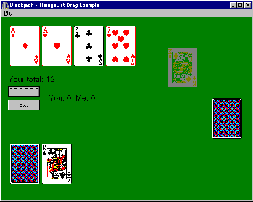
The example program for this article is a simple implementation of the popular card game, Black Jack. As the cards are dealt, they are animated using the techniques discussed in this article. In addition, the player can drag his or her cards around on the screen. We don’t provide the code listing for the example program here because so much of the code is unrelated to this article’s topic, but you can download the example from our Web site at www.bridgespublishing.com. Figure A shows the example program running.
Figure A
Dragging images is easy with TImageList..
I should mention that the example program uses a modified version of the CARDS.DLL that ships with Windows. The version that ships with Windows 95 and 98 is a 16-bit DLL and cannot be used with C++Builder. The modified version, CARDS2.DLL, is a 32-bit version is provided for testing purposes only. The images in CARDS2.DLL are copyrighted by Microsoft and, as such cannot be distributed with your applications.
Dragging images, whether programmatically or using the mouse, is fairly simple using the functionality provided by TImageList. You may be able to benefit from the ability to drag image list items, regardless of whether your program is a game or a business application.