C++Builder makes it fairly easy to create your own ActiveX controls derived from a VCL component. However, if you add some new properties to your new ActiveX control, you might be astonished to find that your control does not behave as you expected. Specifically, when embedded in an application, all settings you make for these new properties in the Object Inspector are forgotten when you run the program. That is, they are set back to their default values. In this article I will show you how to make your control remember the settings. Or, as the computer scientist would say, how to make the properties of your control persistent.
When you derive an ActiveX control from a VCL component, the complex structure of the resulting class ensures that all properties of the base component are saved and loaded automatically. The real work comes when you add new properties to the control. You’ll need to do this in most cases, since you generally do not want to produce an ActiveX control that is identical to its underlying VCL component.
Unfortunately the problem of making your own properties persistent is almost completely undocumented. If you dig into the code generated by C++Builder, you will have to try hard to find out which operations carry out the saving and loading of the base component’s properties. A class for an ActiveX control in C++Builder is usually derived from TVclControlImpl. This class alone has seventeen base classes!
One of these base classes is a class called TVclComControl. It comprises the basic functionality for creating an ActiveX control from a VCL component. TVclComControl has the methods we are looking for. In C++Builder 3 and 4 the methods are called IPersistStreamInit_Load() and IPersistStreamInit_Save(). In C++Builder 5, the methods were renamed to IPersistStreamInit_LoadVCL() and IPersistStreamInit_SaveVCL(). (Note that this article was written prior to the release of C++Builder 5. The techniques discussed in this article have not been tested with that version.) In principle, to make your new properties persistent, all you have to do is to overload these two functions. This is exactly what I will show you next.
To illustrate, I created a sample control called ClockLabelX. This control is a simple text label that displays the current time. In the following paragraphs I refer to “the implementation class.” In this case I am referring to the TClockLabelXImpl class. This class is generated by the IDE when you create a new ActiveX control. The steps discussed in this section are an abstract of what is required to implement persistence for your ActiveX control properties. Later I will get into the specifics of the ClockLabelX ActiveX control.
First you have to declare the two functions you need to overload. Put the declarations in the public part of the implementation class of your control (note that these are the C++Builder 3 and 4 declarations):
HRESULT IPersistStreamInit_Load(
  LPSTREAM pStm,
  ATL_PROPMAP_ENTRY* pMap);
HRESULT IPersistStreamInit_Save(
  LPSTREAM pStm, BOOL fClearDirty,
ATL_PROPMAP_ENTRY* pMap);When implementing the load method you start with calling the respective operation of the base class TVclComControl. Since this is defined via templates, you need to give the name of your implementation class and of the base VCL component as parameters. For example:
HRESULT TClockLabelXImpl::
  IPersistStreamInit_Load(
    LPSTREAM pStm,
    ATL_PROPMAP_ENTRY* pMap)
{
  HRESULT hr = S_OK;
  hr = TVclComControl<
    TClockLabelXImpl, TStaticText>
    ::IPersistStreamInit_Load(pStm,pMap);
  if (FAILED(hr))
    return hr;
...Next you load the values of the properties you have added. You have to pick them out of the byte stream using the pStm->Read() function, which needs the address of the variable and its size. For a property of type long, the code might look like this:
long lInterval;
hr = pStm->Read(
  &lInterval, sizeof(long), NULL);
if (FAILED(hr))
  return hr;
set_UpdateInterval(lInterval);
Afterwards you can set the value internally.
Saving the values of your properties works in much the same way. You first call the save function of the base class:
HRESULT TClockLabelXImpl
  ::IPersistStreamInit_Save(
    LPSTREAM pStm, BOOL fClearDirty,
    ATL_PROPMAP_ENTRY* pMap)
{
  HRESULT hr = S_OK;
  hr = TVclComControl<
    TClockLabelXImpl, TStaticText>
    ::IPersistStreamInit_Save(
      pStm, fClearDirty, pMap);
  if (FAILED(hr))
    return hr;
  ...
Next you retrieve the current value and write it to the stream:
long lInterval;
get_UpdateInterval(&lInterval);
hr = pStm->Write(
  &lInterval, sizeof(long), NULL);
if (FAILED(hr))
return hr;Now let’s take a look at a complete ActiveX control. As I have said, the ActiveX control I created for this article is called ClockLabelX. The control is a numeric clock that displays the current time, updated at a given interval. Optionally, you can display the date in addition to the time.
I used TStaticText as the base class for the ClockLabelX control. I derived from TStaticText because C++Builder only allows you to create ActiveX controls from VCL components that have a window (and, by extension, a window handle). TLabel is a non-windowed control and cannot be used to create an ActiveX control. TStaticText, on the other hand, is a windowed label component and can be used as the base class for an ActiveX control.
ClockLabelX adds three properties not found in the base class. Those properties are shown in Table A.
Table A: ClockLabelX Properties
|
Property |
Type |
Description |
|
Active |
VARIANT_BOOL |
Specifies
whether the label is updated at regular intervals. |
|
ShowDate |
VARIANT_BOOL |
Specifies
whether the date is displayed in the |
|
UpdateInterval |
long |
Specifies
the time interval (in milliseconds) at |
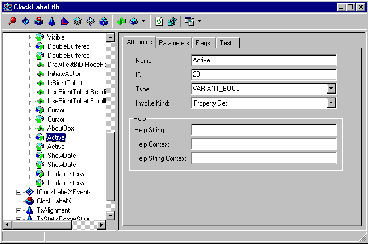
After you have created the shell of the ActiveX control, you add properties via the Type Library Editor. Simply add a new property, give it the appropriate name, and set its data type. Figure A shows the Type Library Editor after adding the new properties.
Figure A
Add your own properties to the control using the Type Library Editor.
C++Builder will add the property declaration and the get and set functions to the implementation unit. You will need to fill out the get and set methods, of course. Listings A and B show the code I added to the implementation unit’s header and to the unit itself. These listings don’t show the code that was added automatically by C++Builder. I should add that the code shown in the listings is the code for C++Builder 4.
The values of all these properties should be persistent. To accomplish this, the implementation class contains code to save and load the property values as described in the previous section. It also includes code for the timer and painting of the control. That code is fairly straightforward so I won’t explain it in this article.
When you use the control in an application, you will see that the new properties behave as you would expect. That is, they behave just as the VCL properties do.
Creating an ActiveX control with C++Builder is fairly easy, but the support does not (or cannot) go as far as it does for the underlying VCL control. The saving and loading of the values of additional properties is not guaranteed automatically. As you have seen, it is not very complicated to implement persistence. You only have to overload two methods in which you call the operations of the base class and then call the load or save functions accordingly.
ActiveX controls are an essential step on the way to component oriented software development. They allow you to transfer the component concept that you appreciate in C++Builder to numerous other programming environments. With the support you get from C++Builder, it has become easy to make your own visual components enduring and reusable.
Listing A: Code added to the implementation unit’s header.
private:
  TTimer*  FTimer;
  bool     FShowDate;
  void __fastcall OnTimer(TObject* Sender);
public:
  __fastcall TClockLabelXImpl();
  __fastcall ~TClockLabelXImpl();
  HRESULT IPersistStreamInit_Load(
    LPSTREAM pStm, ATL_PROPMAP_ENTRY* pMap);
  HRESULT IPersistStreamInit_Save(
    LPSTREAM pStm, BOOL fClearDirty,
    ATL_PROPMAP_ENTRY* pMap);
Listing B: Code added to the implementation unit’s source.
__fastcall TClockLabelXImpl::TClockLabelXImpl()
{
  FTimer = new TTimer(m_VclCtl);
  FTimer->Enabled = true;
  FTimer->Interval = 1000;
  FTimer->OnTimer = OnTimer;
  FShowDate = false;

  ShortDateFormat = "mm'/'dd'/'yyyy";
  LongTimeFormat = "hh:mm:ss";
  OnTimer(NULL);
}

__fastcall TClockLabelXImpl::~TClockLabelXImpl()
{
  delete FTimer;
}

void __fastcall
TClockLabelXImpl::OnTimer(TObject* Sender)
{
  if (FShowDate)
    m_VclCtl->Caption = Date().DateString() +
    ", " + Time().TimeString();
  else
    m_VclCtl->Caption = Time().TimeString();
}

STDMETHODIMP
TClockLabelXImpl::get_Active(TOLEBOOL* Value)
{
  try
  {
    *Value = FTimer->Enabled;
  }
  catch(Exception &e)
  {
    return Error(
      e.Message.c_str(), IID_IClockLabelX);
  }
  return S_OK;
};

STDMETHODIMP
TClockLabelXImpl::get_ShowDate(TOLEBOOL* Value)
{
  try
  {
    *Value = FShowDate;
  }
  catch(Exception &e)
  {
    return Error(
      e.Message.c_str(), IID_IClockLabelX);
  }
  return S_OK;
};

STDMETHODIMP
TClockLabelXImpl::get_UpdateInterval(long* Value)
{
  try
  {
    *Value = FTimer->Interval;
  }
  catch(Exception &e)
  {
    return Error(
      e.Message.c_str(), IID_IClockLabelX);
  }
  return S_OK;
};

STDMETHODIMP
TClockLabelXImpl::set_Active(TOLEBOOL Value)
{
  try
  {
    const DISPID dispid = 23;
    if (FireOnRequestEdit(dispid) == S_FALSE)
      return S_FALSE;

    FTimer->Enabled = Value;
    FireOnChanged(dispid);
  }
  catch(Exception &e)
  {
    return Error(
      e.Message.c_str(), IID_IClockLabelX);
  }
  return S_OK;
};

STDMETHODIMP
TClockLabelXImpl::set_ShowDate(TOLEBOOL Value)
{
  try
  {
    const DISPID dispid = 24;
    if (FireOnRequestEdit(dispid) == S_FALSE)
      return S_FALSE;

    FShowDate = Value;
    FireOnChanged(dispid);
  }
  catch(Exception &e)
  {
    return Error(
      e.Message.c_str(), IID_IClockLabelX);
  }
  return S_OK;
};

STDMETHODIMP
TClockLabelXImpl::set_UpdateInterval(long Value)
{
  try
  {
    const DISPID dispid = 25;
    if (FireOnRequestEdit(dispid) == S_FALSE)
      return S_FALSE;

    FTimer->Interval = Value;
    FireOnChanged(dispid);
  }
  catch(Exception &e)
  {
    return Error(
      e.Message.c_str(), IID_IClockLabelX);
  }
  return S_OK;
};

HRESULT TClockLabelXImpl::IPersistStreamInit_Load(
  LPSTREAM pStm, ATL_PROPMAP_ENTRY* pMap)
{
  HRESULT hr = S_OK;
  hr = TVclComControl<TClockLabelXImpl,TStaticText>
    ::IPersistStreamInit_Load(pStm,pMap);
  if (FAILED(hr))
    return hr;

  long lInterval;
  hr = pStm->Read(&lInterval, sizeof(long), NULL);
  if (FAILED(hr))
    return hr;
  set_UpdateInterval(lInterval);

  TOLEBOOL bActive;
  hr = pStm->Read(
    &bActive, sizeof(TOLEBOOL), NULL);
  if (FAILED(hr))
    return hr;
  set_Active(bActive);

  TOLEBOOL bShowDate;
  hr = pStm->Read(
    &bShowDate, sizeof(TOLEBOOL), NULL);
  if (FAILED(hr))
    return hr;
  set_ShowDate(bShowDate);

  return hr;
}

HRESULT TClockLabelXImpl::IPersistStreamInit_Save(
  LPSTREAM pStm, BOOL fClearDirty,
  ATL_PROPMAP_ENTRY* pMap)
{
  HRESULT hr = S_OK;
  hr = TVclComControl<TClockLabelXImpl,TStaticText>
    ::IPersistStreamInit_Save(
      pStm, fClearDirty, pMap);
  if (FAILED(hr))
    return hr;

  long lInterval;
  get_UpdateInterval(&lInterval);
  hr = pStm->Write(&lInterval, sizeof(long), NULL);
  if (FAILED(hr))
    return hr;

  TOLEBOOL bActive;
  get_Active(&bActive);
  hr = pStm->Write(
    &bActive, sizeof(TOLEBOOL), NULL);
  if (FAILED(hr))
    return hr;

  TOLEBOOL bShowDate;
  get_ShowDate(&bShowDate);
  hr = pStm->Write(
    &bShowDate, sizeof(TOLEBOOL), NULL);

  return hr;
}