In the past several years we have seen incredible growth in networks in general, and the Internet in particular. Not surprisingly, the demand for Internet-based applications has increased as a result. Even if you’re not currently working on an Internet application, you should take the time to learn a little about programming for the Internet The foundation of all network programming is the socket. In this article I will explain how the VCL facilitates the use of sockets.
A socket is a very simple but powerful mechanism that allows communication between two or more applications. More precisely, sockets are the connection endpoints between the applications. One of the most interesting things about sockets is that you can safely ignore the boring details of the underlying network. It doesn’t matter if two applications communicating with one another are running on the same machine, on two machines on the same local network, or on machines that are thousands of miles apart. It is only important to know that the applications are running on machines that are connected by some (hopefully functioning) hardware. For the most part you don’t event need to know much about the protocol that allows the two machines to communicate (such as TCP/IP).
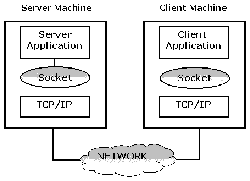
Before going on, I need to explain some of the terms used to describe socket connections. Figure A illustrates a simple socket connection.
The client and server machines run a client and server application, respectively. Between them is the magical network that facilitates the transfer of data between the two machines. At the both ends of the connection is the TCP/IP protocol. The protocol translates data into a form the socket can understand. The individual applications then pump data through the socket. This particular type of connection is often defined as a client/server connection. The server offers its services to the client and manages incoming client requests. The client, on the other hand, makes its requests to the server, and expects an answer in reply.
Figure A
This diagram shows the simplest type of a socket connection between two applications.
But what exactly is a service? Generally speaking, a service is a set of operations the server is able to perform. Often this means that the server provides the client with some type of data. What that data is depends entirely on the server itself. Whether you know it or not, you use a lot of services when simply navigating the Internet. For example, the HTTP service is used when browsing Web pages and the FTP service is used when downloading files.
Known services are often associated with a particular port. A port is a numeric value that identifies a given service. Many common services have a standard port value. The POP3 service, for example, uses port 110, the FTP service uses port 21, and the SMTP service uses port 25. You can see the relationships between common services and ports by looking in the SERVICES file (search your WINDOWS or WINNT directory to locate this file).
Finally, we come to the terms host names and IP address. An IP address is a 32-bit value, typically displayed as a group of four numeric values, 165.212.210.41, for example. The IP address identifies the network and a particular machine running on that network (whether client or server). Since an IP address is often difficult to remember, host names are used to describe a particular IP address. The host name is simply a string that refers to a particular IP address. For example, the host name www.bridgespublishing.com is mapped to the IP address 165.212.210.41.
There is one other aspect of socket connections that you need to be aware of. A socket can establish a connection in one of two ways, blocking and non-blocking.
In a blocking connection, the receiver is blocked while waiting for the message sent by the sender. As such, it can't do anything else until the expected message arrives. In this way, blocking connections are synchronous operations.
Non-blocking connections, on the other hand, allow the receiver to go about its business while waiting for a message from the sender. When the message arrives, an event signals the receiver of the incoming data. Non-blocking connections are asynchronous operations.
A blocking connection is preferred when using a precise protocol for data exchange. The synchronous nature of a blocking connection means that the normal I/O of an application is halted while the operation is being carried out. A non-blocking connection is more flexible and a bit simpler to use. For this reason, I will concentrate only on non-blocking connections in this article.
Before the client begins to send data to or receive data from the server, it needs to establish a socket connection. Obviously, if the server isn’t available, the client cannot connect to anything. As a first step, I’ll explain how to create a server. Later I’ll show how a client can connect to that server. Along the way I’ll introduce you to the socket components that ship with the Client/Server and Enterprise versions of C++Builder.
When writing a server application, you use the TServerSocket component (located on the Internet tab of the Component palette). This component has a number of properties and methods that allow you to activate and manage connections. The primary properties are:
Port
Service
Active
The Port and Service properties correspond to the previous explanation of ports and services. It is necessary to set one of these properties before opening a server; since the server needs to know where to listen for the client requests. After setting either of these properties, you set the Active property to true to start the server listening. Alternatively, you can use the Open() and Close() methods to start and stop the server. For example, suppose you want to open a server using port number 5000:
// Shut down the server before
// changing the port value.
ServerSocket1->Close();
ServerSocket1->Port = 5000;
ServerSocket1->Open();
If the host name of the service is known (for example “MyOwnService”), you can safely exchange the second line of the previous code with this one:
ServerSocket1->Service = "MyOwnService";When you activate the server, the socket opens a listening connection. This is a particular type of connection (also called a half connection), because the server isn't really connected with something. Instead, the server is ready and listening for client requests. Only when the server receives and accepts a client request does it create a new socket, a server socket. This socket will manage the connection with the specific client. The server will continue to listen on the original socket for additional client connection requests.
Once the server is up and listening it handles client requests as needed. I’ll explain this further in a later section.
Any client can attempt to connect to a listening server. For client applications, C++Builder provides the TClientSocket component. TClientSocket has many properties and methods in common with TServerSocket, because both are derived from the base class TAbstractSocket. TClientSocket has these primary properties:
Address
Host
Port
Service
Active
As you can see, there are two primary properties not found in TServerSocket, Address and Host. These properties let you specify the server location by its IP address or its host name. In order to open a connection with a server, you need to specify at least one of these properties. Also, it's necessary to set the Port or Service properties to match the server. For example, if you want to connect a client to the server shown in the previous code, you would write code like this:
//Disable client connection
ClientSocket1->Close();
ClientSocket1->Address = "123.45.6.78";
ClientSocket1->Port = 5000;
ClientSocket1->Open();
Of course, if you know both server host name and service, you can use the following code:
ClientSocket1->Host = "www.server.com";
ClientSocket1->Service = "MyOwnService";
If the client finds a server at the specified address, and if the server is listening on the specified port, the connection is established. But, how does a server know that a client is trying to connect? Also, how does the client know that the server accepted the connection request? This information is presented to you in the form of VCL events.
During a connection, both client and server components generate events so you can proceed with specific actions. There are two primary sets of events concerning socket components:
Events that can occur when a client is trying to connect with the server.
Events that take place during the connection.
I’ll concentrate on the first set of events, from both the client and server point of view.
On the client side, there are three events that take place one after the other:
OnLookup
OnConnecting
OnConnected
The first event occurs just after you set the client’s Active property to true. At this point, you cannot modify the Host, Address, Service, and Port properties.
After, the socket is initialized and the server located, the OnConnecting event is generated. At his point it is possible to begin collecting information about the connection. If the server accepts the client connection request, the connection is completed and the OnConnect event is generated. You can start reading and writing data over the connection within your OnConnect event handler. If something goes wrong, the client socket generates an OnError event.
On the server side, things are a bit more complicated because the server has to take more actions than the client. The primary events that are generated for TServerSocket are:
OnListen
OnGetSocket
OnClientConnect
OnAccept
The OnListen event occurs just before opening the server. After this event is processed, the listening socket is ready to receive client requests.
When a client tries to connect with the server, the listening socket creates a new server socket, and generates the OnGetSocket event. This event is followed by an OnClientConnect event. At this point, the server can safely begin to send data over the connection. Finally, the OnAccept event is generated after the client request has been accepted.
Once the connection between client and server has been established, they can begin to “talk” to one another. Both TServerSocket and TClientSocket encapsulate a Windows socket object. This object is represented by the Socket property. For a client, it represents a client socket while, for a server, it represents a listening socket.
The Socket object provides several helpful properties and methods to gather information about the socket, and for writing and reading over the connection.
There is a common misunderstanding regarding the Socket property that needs to be clarified. Both classes use the same property name (Socket) for Windows socket objects. The two objects are quite similar, but in reality these socket objects are different. For a client socket, the Socket property is an instance of TClientWinSocket. For the server, it’s an instance of the TServerWinSocket class.
These two classes are derived from a common base class, TCustomWinSocket. As such, they share many properties and methods. As you can imagine, this fact hides some important differences. The major difference concerns the listening socket. As I have said, when a new client connects with the server, the server creates a new socket. This socket will be in charge of communications with the particular client that requests the connection. The server’s listening socket provides two important properties that maintain information about the active connections. Those properties are ActiveConnections, and Connections.
The ActiveConnections property is an integer value specifying the number of currently open client connections. The Connections property is an array of pointers to all the server sockets created. When the first client connects to the server, a new server socket is created, and its pointer is stored in the array. You can access properties and methods of the first server socket connection using:
ServerSocket1->Socket->Connections[0] If the server accepts another connection request from a different client, a new server socket is created, and a pointer is stored in the next free index of the array.
Luckily, you don’t normally have to select a server socket by index in order to interact with a specific client. The events generated during the connection will give you the pointer for the appropriate socket.
After the client has connected to the server, you can collect information about the new connection using the socket object’s properties. The primary properties are:
LocalHost
LocalAddress
LocalPort
RemoteHost
RemoteAddress
RemotePort
The properties that begin with “Local” provide you with information about the local socket (the one you are actually using). Those beginning with “Remote” refer to the socket at the other end of connection. For a client application, you will write code to access the socket inside the OnConnect event handler. For a server application you can use OnClientConnect. Both events pass you a Socket parameter to provide access to the socket. For example, if the server needs to show that a new client is connected, you can use code similar to this:
void __fastcall
TForm1::ServerSocket1ClientConnect(
  TObject *Sender,
  TCustomWinSocket *Socket)
{
  Memo1->Lines->Add
    ("New client connected!");
  Memo1->Lines->Add("Client name is "
    + Socket->RemoteHost);
  Memo1->Lines->Add("Client address is "
    + Socket->RemoteAddress);
  Memo1->Lines->Add("Client port is " +
    (String)Socket->Port);
}
As you can see, the event handler provides you two parameters, Sender and Socket. The Sender parameter is a pointer to the listening socket, and the Socket parameter is a pointer to the server socket connected with the client. In this example, all references to the Remote properties refer to the client.
If a client application desires to send data to the server, it can use methods of the Socket property. The two primary methods are SendBuf(), and SendText().
SendBuf() requires two parameters. The first parameter is a pointer to the buffer containing some data, and the second parameter is the number of bytes of the buffer that must be sent. For example:
char buffer[10] =
  {0, 1, 2, 3, 4, 5, 6, 7, 8, 9};
//Send the entire buffer
ClientSocket1->
  Socket->SendBuf(buffer, 10);
For non-blocking connections, SendBuf() sends data via the Windows’ WinSock DLL. If WinSock has no more space to queue the data, SendBuf() returns -1 and no data is queued. In this case you will need to wait for a period of time and try to resend the data.
A simpler approach is to use the SendText() method. This method requires only one parameter, an AnsiString:
AnsiString msg = "Hi, there!";
ClientSocket1->Socket->SendText(msg);
When the client receives a message from the server, an OnRead event is generated. You can deploy an event handler to grab the message, using one of these methods:
ReceiveLength()
ReceiveBuf()
ReceiveText()
If you want to use the ReceiveBuf() method, you must first call ReceiveLength() to determine how many bytes are in the incoming message. ReceiveBuf() takes two parameters, a pointer to a buffer for receiving data, and a number of bytes to read. This code reads a message coming from a server:
void __fastcall
TForm1::ClientSocket1Read(
  TObject *Sender,
  TCustomWinSocket *Socket)
{
  char *buffer;
  int  buffer_len;

  // get the message length
  buffer_len = Socket->ReceiveLength();
  // create a new buffer big
  // enough to contain the message
  buffer = new char[buffer_len];
  // get the message
  if (Socket->ReceiveBuf(
    buffer, buffer_len) == -1)
  {
    ShowMessage ("No message received!");
    // free the buffer
    delete[] buffer;
    return;
  }

  // code here that uses the data

  // free the buffer
  delete[] buffer;
}
As I said earlier, the OnRead event handler provides you a Socket parameter. For the client, this Socket parameter points to the same object as the component’s Socket property. ReceiveBuf() returns the number of bytes read, or, if no bytes are read, it returns -1.
The ReceiveText() method is even easier to use, as it returns an AnsiString object:
void __fastcall
TForm1::ClientSocket1Read(
  TObject *Sender,
  TCustomWinSocket *Socket)
{
  String message = Socket->ReceiveText();

  // use the message
  ...
}
Server transmission of data is similar to that of the client. The principal difference is that the Connections property of the listening socket object is used when you want to write to a specific client. Suppose you want to send a message to the first client. In that case you would write code like this:
ServerSocket1->Socket->Connections[0]
  ->SendText ("Are you there?");
If you want to broadcast a message to all clients, you can iterate over all active connections using the ActiveConnections property:
for (int i=0;i<SocketServer1->Socket->
      ActiveConnections;i++)
  ServerSocket1->Socket->Connections[i]
    ->SendText("Server shuting down");
When a server receives a message, an OnClientRead event is generated. A pointer to the server socket is passed as a parameter, so the server can respond directly to the client:
void __fastcall
TForm1::ServerSocket1ClientConnect(
  TObject *Sender,
  TCustomWinSocket *Socket)
{
  String ClientRequest =
    Socket->ReceiveText();
  if (ClientRequest == "Send me file X")
    SendFileX(Socket);
}
In this case, the Sender parameter represents the listening socket, while the Socket parameter indicates the server socket connected to the client.
Eventually, you will need to terminate the connection. To terminate the connection from the client side, you simply call the Close() method (or set Active to false). Regardless of who closes the connection, an OnDisconnect event is generated at the client.
Calling the Close() method for a server socket results in all active connections begin closed, and the server will quit listening. To terminate a specific client connection, call the Close() method of that client (using the Connections property). When the client socket terminates the connection, the server receives an OnClientDisconnect event.
In this article I have explained the basics of communication between two or more applications through the use of sockets. In particular I showed you how to establish a connection between a client and a server, how to pass data between the two applications, and how to close the connection. As you can see, using sockets is not difficult once you know these basics. The best way to further understand this topic is to create a simple server and client and spend some time experimenting.
The code for this article consists of simple server and client applications. You can download the code from www.bridgespublishing.com and examine it to see the client/server relationship in action.