Using the ADO access components
by Kent Reisdorph
C++Builder makes database programming fairly easy, at least compared to other C++ programming environments. One of the problems with C++Builder database programs is the fact that all database applications must use the Borland Database Engine (BDE). The BDE is a very robust way of connecting your program to its data. However, installing the BDE on your customers’ machines can be frustrating. Further, the BDE files must be shipped with your program and that means more installation overhead.
Fortunately, C++Builder 5 includes a set of components that allow you to connect directly to any ActiveX Data Object (ADO) data source. Borland calls these components ADOExpress. ADOExpress ships with C++Builder Enterprise edition, but Professional edition owner can purchase ADOExpress separately (for a reasonable amount of money, I might add). An application built using the ADO components does not use the BDE. As such, you do not have to ship the BDE when deploying these applications.
This article will explain the ADO components in C++Builder 5 and how to use them to connect to ADO data sources.
Note: C++Builder 5 also comes with a set of similar components for InterBase database access, called InterBase Express. The InterBase Express components ship with the Professional and Enterprise versions of C++Builder.
What is ADO?
ADO is a Microsoft technology that adds object-oriented access to a variety of data sources. ADO is essentially a wrapper around Microsoft’s OLE DB technology. ADO can be used to access FoxPro or Access databases, Microsoft SQL Server, Oracle databases, dBASE files, and so on. Basically, if you have an ODBC connection for a particular data source you can use ADO to access that data. One implication is that you can write an application that uses dBASE files without the need for the BDE.
The ADO components
The ADO components that come with C++Builder 5 allow access to any ADO data set. Those components include:
TADOConnection
TADOCommand
TADOTable
TADOQuery
TADOStoredProc
TADODataSet
TRDSConnection
With the exception of TRDSConnection, each of these components has a ConnectionString property. This property is used to specify the connection parameters for a connection. Connection parameters include provider name, driver name, user name, password, and other connection-specific parameters. I will explain how to set the ConnectionString property in the next section.
Most of the ADO components also have a Connection property. When a form or data module includes a TADOConnection, component, this property can be used to hook up one of the ADO data access components (TADOQuery, TADOTable, or TADOStoredProc) to the TADOConnection. This statement requires a bit of explanation.
The ADO components can be used in one of two ways. One way is to set the ConnectionString property of a particular data access component as needed. The other way is to use a TADOConnection component and hook the data access component’s Connection property to the TADOConnection. You will probably use the first method when you have a single TADOQuery, TADOTable, or TADOStoredProc on a form. You will likely use the second method if you have a number of data access components in your application and you want all of those components to share a single connection to the database.
When you use this second method you set the ConnectionString property of the TADOConnection as needed, and then hook other data access components to the TADOConnection using the Connection property. In this way, you only need to set the ConnectionString property for the TADOConnection rather than for each individual data access component. The TADOConnection property works somewhat like the traditional TDatabase component. That is, it provides a central connection point that other components can use to access data.
Setting the ConnectionString property
The ConnectionString property contains all of the information that ADO needs to connect to a particular data source. Looking at the VCL help for the ConnectionString property makes it appear that setting the connection string is tedious. In reality, you can simply use the property editor provided for this property.
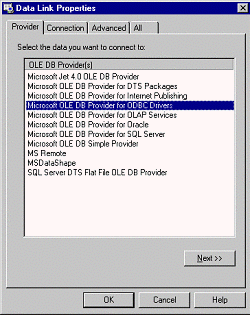
To invoke the property editor, double-click next to the ConnectionString property in the Object Inspector. When you do, the Data Link Properties dialog is displayed. This dialog has four pages. The first page, Provider, is used to specify the type of ADO connection you want to use (see Figure A). For an Access database, choose the Jet OLE DB Provider. For a dBASE database, choose the provider for ODBC drivers. For other data sources (such as Microsoft SQL Server) choose the provider for that specific data source.
Figure A
The Provider page of the Data Link Properties dialog is where you specify the data source type.
After selecting the provider, click the Next button or click on the Connection tab. The Connection page varies a bit depending on the provider type you selected on the Provider page. Basically, the connection page allows you to select the location of the data (by server, file name, or directory), and the user name and password (if required). This page also has a button called Test Connection that you can use to verify that the parameters you specified are correct and that the ADO component can connect to the database. The connection dialog is shown in Figure B.
Figure B
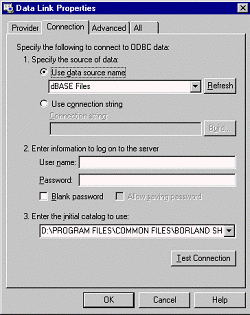
The Connection page is where you set the connection parameters, those for a dBASE database in this case.
The Advanced page is where you can set the connection timeout and access permissions. In some cases the database server controls the access permissions. For those types of connections that section of the Advanced page will be disabled.
The All page allows you to see each connection string and to modify the value of the string if necessary. Some of the connection string values are taken from the selections made on the first two pages of the dialog. The actual connection strings shown depend on the type of provider being used.
All in all, the ConnectionString property editor provides a relatively easy way to set the connection strings for an ADO connection.
Using the ADO components
Once you have established a connection (with or without a TADOConnection component) many of the ADO components behave just like their BDE counterparts. The TADOTable component, for example, has a TableName property that works just like the TTable property of the same name. The TADOQuery and TADOStoredProc components also behave just like TQuery and TStoredProc. Most importantly, you can hook the ADO components to a TDataSource and proceed just like you do with your BDE programming.
For the most part, the TDataSet properties, methods, and events that you use now can also be used with the ADO components. For example, the First(), Last(), Next(), Prior(), FieldByName(), ParamByName(), etc. methods are still available for your use. Some of the events are different for the ADO components, but most of the TDataSet events are still there.
The TADODataSet component is the most basic of the ADO components. It allows you to retrieve data using a SQL statement, but you can only perform SELECTs. To be honest, I’m not sure why you would use this component when you could just use TADOQuery instead.
The TADOCommand component is used to issue ADO commands to a data source. It is a wrapper around ADO’s Command object. TADOCommand can return a record set. However, since it is not descended from TDataSet it cannot be hooked to a TDataSource. What you do, then, is assign the return value of the Execute() method to a TADODataSet’s Recordset property. For example, let’s say that you had a TADOCommand with a CommandText property set to the following SQL statement:
select * from Cusomter
The code to execute the command might look like this:
ADODataSet1->Recordset =
  ADOCommand1->Execute();
The TADODataSet could then be hooked up to a TDataSource in order to display the results in data-aware components.
You can use TADOCommand if you have to issue commands directly to ADO, otherwise use TADOQuery or TADOStoredProc.
Conclusion
The new ADO components in C++Builder 5 offer a simple and effective way of accessing ODBC data sources without having to install the BDE when you deploy your applications. Delphi and C++Builder users have been asking for a way to connect to ODBC databases without using the BDE and ADOExpress is Borland’s answer to those requests.