Transparent 2000
by Mark G. Wiseman
If you are writing a program to be run on Windows 2000 only and you need to have a transparent window, I’ve got just the API call for you. If you need transparency and are writing for other versions of Windows, you can still use this function when running on 2000.
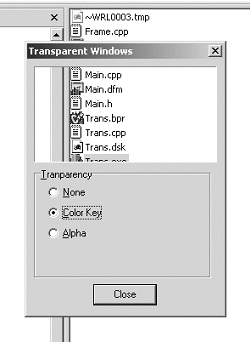
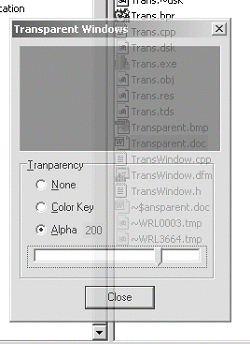
Starting with Windows 2000, Microsoft introduced the function, SetLayeredWindowAttributes() in the Windows API. I’ve written a small demonstration program that you can download from the Bridges Publishing Web site. Figures A and B show the program in two different transparency states. You can see part of Windows Explorer underneath the program window.
Figure A: Demo Program using Color Key Transparency.
Perfectly transparent
So, how do you create transparent windows in Windows 2000? The first thing you have to do is tell Windows that your form is a layered window. You can do this by setting the extended window style bit, WS_EX_LAYERED. Here is the code for that:
SetWindowLong(Handle, GWL_EXSTYLE,
  GetWindowLong(Handle, GWL_EXSTYLE)
  & ~WS_EX_LAYERED);
Now all you need to do is call SetLayeredWindowAttributes(). Here is the prototype for this function:
BOOL SetLayeredWindowAttributes(
  HWND hwnd, COLORREF crKey,
  BYTE bAlpha, DWORD dwFlags);
The hwnd parameter is a handle to your form. Either the crKey or bAlpha parameter is used based on the value of the dwFlags parameter. There are two flags you can use with the dwFlags parameter: LWA_COLORKEY and LWA_ALPHA.
Using this dwFlags parameter to SetLayeredWindowAttributes(), you can create two types of transparency. The first type, color key transparency, makes a specific color in the window transparent. This is what you see in Figure A. The transparent part of the form is just a TPanel with its color set to clRed. The second type of transparency is alpha-blending. With alpha-blending the entire form becomes transparent. Figure B shows this.
When you use the LWA_COLORKEY flag, you have to set the crKey parameter to the color you want to become transparent. Any part of your form that has this color will become transparent, so you need to be careful. In the demo program, I chose a color, clRed that was only used as the color of a TPanel that I wanted to become transparent.
SetLayeredWindowAttributes(
  Handle, clRed, 0, LWA_COLORKEY);
When dwFlags is set to LWA_ALPHA, alpha-blending is used. As I mentioned, the entire form or window becomes transparent with alpha-blending. You can set the amount of transparency using the bAlpa parameter. When bAlpha is set to 255, the form is opaque and looks just like a normal window. If you set bAlpha to 0, the form becomes completely transparent – invisible! In Figure B, I have set the bAlpha value to 200 using the slider control.
SetLayeredWindowAttributes(
  Handle, 0, 200, LWA_ALPHA);
Figure B: Demo Program using Alpha-Blending.
Conclusion
Using layered windows is a really easy way to program transparency. Unfortunately SetLayeredWindowAttributes() only works with Windows 2000. There are ways to make forms transparent in Windows 9x and NT, but they are much more difficult and beyond the scope of this article.
Also, you need to remember to be careful if you are using alpha-blending. Make sure you give the users of your program a way to find the form if they make it completely invisible.