Printing Bitmaps III: Wrapping Things Up
by Damon Chandler
In the first article of this series, I presented a conceptual overview of three types of bitmaps: DDBs, DIBs, and DIB section bitmaps. Last month, we examined how to use the StretchDIBits() function to send a DIB to the printer. This time, we’ll wrap all of the printing code into a reusable class, and I’ll discuss a technique called "banding" which can enhance the reliability of the StretchDIBits() function.
The TBitmapPrinter class
In the past two articles, we’ve covered a fair bit of conceptual information and code. Now it’s time to consolidate these ideas and procedures into a class; we’ll call this class TBitmapPrinter. Before we get our hands dirty with the implementation, however, let me present a short code snippet that demonstrates what this class should be able to do once it’s complete:
#include <printers.hpp>
#include <memory>

// create a TBitmapPrinter object
std::auto_ptr<TBitmapPrinter> BitmapPrinter(new TBitmapPrinter());

// (1) set the Bitmap
BitmapPrinter->Bitmap = Image1->Picture->Bitmap;

// (2) set the target rectangle
BitmapPrinter->PrintRect = Rect(0, 0,
                                Printer()->PageWidth,
                                Printer()->PageHeight);

// (3) print the image
Printer()->BeginDoc();
BitmapPrinter->PrintBitmap(Printer()->Canvas->Handle);
Printer()->EndDoc();
There are three main steps in this code snippet: (1) specifying the bitmap to be printed; (2) specifying the location and dimensions on the page where this bitmap should be printed; and (3) specifying the device context of the device with which this bitmap should be printed.
We’ve actually discussed all of the code necessary to accomplishing these three steps, so we can move through the implementation fairly quickly. Listing A shows the declaration of the TBitmapPrinter class. Here we’ll focus on implementing the TBitmapPrinter::DoSetBitmap() and DoInternalPrintBitmap() member functions.
Setting the Bitmap
From Listing A, you can see that assigning a TBitmap object to the TBitmapPrinter::Bitmap property invokes the DoSetBitmap() member function. The DoSetBitmap() member function will do two things: it will "create" a DIB from the specified TBitmap object, storing the results in the private pDIB_ and pBits_ members; and, it will create a copy of the Bitmap’s palette, storing the result in the private hPal_ member. Here’s the code:
void __fastcall
TBitmapPrinter::DoSetBitmap(const Graphics::TBitmap* Bitmap)
{
  DeleteObject(hPal_);
  hPal_ = NULL;

  delete [] pBits_;
  pBits_ = NULL;

  delete [] reinterpret_cast<unsigned char*>(pDIB_);
  pDIB_ = NULL;

  if (Bitmap)
  {
    pDIB_ =
    DoCreateDIB(*Bitmap, pBits_);
    hPal_ = CopyPalette(const_cast<Graphics::TBitmap*>
                       (Bitmap)->Palette);
  }
}
Simple enough, right? Actually, most of the work is delegated to the DoCreateDIB() member function, which is identical to the CreateDIB() function that was presented in the last article. (I won’t repeat this function here, but you can see the implementation in the source code. If you don’t have last month’s issue, see www.bridgespublishing.com.) The CopyPalette() function is a VCL utility function that’s declared in graphics.hpp. As its name suggest, this function simply creates a copy of a logical palette.
Printing the Bitmap
Now that we have a DIB (pDIB_ and pBits_), let’s implement the code to print it. From the first code snippet, you can see that this uses the TBitmapPrinter::PrintBitmap() member function. This member function simply calls the DoPrintBitmap() member function, which is defined as follows:
void __fastcall TBitmapPrinter::
DoPrintBitmap(HDC hPrnDC)
{
  if (!pDIB_)
  {
    throw EBitmapPrinterError("No bitmap defined");
  }
  if (!hPrnDC)
  {
    throw EBitmapPrinterError("Invalid printer DC");
  }

  // compute the rectangle to print to
  DoCalculatePrintRect(hPrnDC);

  // print the bitmap
  DoInternalPrintBitmap(hPrnDC);
}
As with the DoSetBitmap() member function, the DoPrintBitmap() member function punts most of its work elsewhere. The DoCalculatePrintRect() member function simply computes the dimensions of the rectangle to print to—by using the GetDeviceCaps() function—and then stores the result in the RPrint_ member. The DoInternalPrintBitmap() member function is the workhorse of the class. It’s from within this member function that the DIB is printed via the StretchDIBits() function.
The DoInternalPrintBitmap function, version 1
We discussed the specifics of the StretchDIBits() function last time, so you should already have an idea of how to define the DoInternalPrintBitmap() member function. Here’s what one version of the function might look like:
void __fastcall TBitmapPrinter::
DoInternalPrintBitmap(HDC hPrnDC)
{
  if (IsRectEmpty(&RPrint_))
  {
    throw EBitmapPrinterError("Invalid target rectangle");
  }

  if (pDIB_ && pBits_)
  {
    //
    // extract the width and the
    // height from the DIB's header
    //
    const int dib_width =
    pDIB_->bmiHeader.biWidth;
    const int dib_height =
    pDIB_->bmiHeader.biHeight;

    // support palettized printers
    bool palettized = GetDeviceCaps(hPrnDC, RASTERCAPS) & RC_PALETTE;
    if (palettized)
    {
      hPal_ = SelectPalette(hPrnDC, hPal_, FALSE);
      RealizePalette(hPrnDC);
    }

    //
    // set the stretching mode
    // to preserve colors
    //
    SetStretchBltMode(hPrnDC, COLORONCOLOR);

    // render the DIB
    bool result = GDI_ERROR !=
                  StretchDIBits(
                               // draw to the printer's DC
                               hPrnDC,
                               // dest rect
                               RPrint_.left, RPrint_.top,
                               RPrint_.right - RPrint_.left,
                               RPrint_.bottom - RPrint_.top,
                               // source rect (entire DIB)
                               0, 0, dib_width, dib_height,
                               // source bits
                               pBits_,
                               // source DIB
                               pDIB_,
                               //color table contains RGBQUADs
                               DIB_RGB_COLORS,
                               // copy source
                               SRCCOPY
                               );

    // restore the original palette
    if (palettized)
    {
      hPal_ = SelectPalette(hPrnDC, hPal_, TRUE);
    }

    // report errors
    if (!result)
    {
      throw EBitmapPrinterError("Error printing DIB");
    }
  }
  // report errors
  else
  {
    throw EBitmapPrinterError("Error getting DIB info");
  }
}
Notice that this implementation is virtually identical to the code related to StretchDIBits()that I presented last time. And, as I mentioned last time, this approach will work on most printers. However, due to memory limitations on Windows-9x/Me-based systems, there is a chance that the StretchDIBits() function will fail. For example, if the target device is, say, a poster printer, the dimensions of RPrint_ may be extremely large. In this case, you’d be asking the StretchDIBits() function to affect a huge stretch, which can be a recipe for disaster. Let’s see how we can work around this problem by using banding.
The DoInternalPrintBitmap function, version 2
Banding is a technique of dividing an image into a series of strips or "bands", and then rendering each strip separately to draw the entire image. Banding is especially useful for drawing large images because you can limit the amount of stretching (and thus, memory) that’s required for each call to the StretchDIBits() function.
The trickiest part of banding is computing which strip of the DIB to render. This chore is delegated to the TBitmapPrinter::DoCalculateBand() member function, which is defined as follows:
bool __fastcall TBitmapPrinter::
DoCalculateBand(RECT& RBand, RECT& RImage)
{
  // compute the printable band area
  if (IntersectRect(&RBand, &RBand, &RPrint_))
  {
    //
    // compute the ratio of the print
    // width to the image width
    //
    const double ratioX =
    static_cast<double>
    (RPrint_.right - RPrint_.left) /
    static_cast<double>
    (RImage.right - RImage.left);

    //
    // compute the ratio of the print
    // height to the image height
    //
    const double ratioY =
    static_cast<double>
    (RPrint_.bottom - RPrint_.top) /
    static_cast<double>
    (RImage.bottom - RImage.top);

    //
    // compute the scaled image band
    // (this will tell us where in the
    // image to blit from)...
    //
    RImage.left = static_cast<int>(
		  0.5 + (RBand.left - RPrint_.left)/ ratioX);

    RImage.top = static_cast<int>(
		  0.5 + (RBand.top - RPrint_.top) /  ratioY);

		RImage.right = RImage.left + static_cast<int>(
		  0.5 + (RBand.right - RBand.left) / ratioX);

    RImage.bottom = RImage.top + static_cast<int>(
		  0.5 + (RBand.bottom - RBand.top) / ratioY);

    return true;
  }
  return false;
}
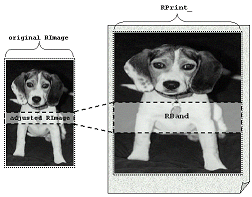
The DoComputeBand() member function takes two RECT-type parameters: RBand and RImage. The RBand parameter specifies a strip of the page to which a corresponding strip of the image should be printed. The RImage parameter specifies the dimensions of the image. These dimensions are used with the RPrint_ member to compute horizontal and vertical scaling factors. These scaling factors are then used with RBand and RPrint_ to adjust RImage so that it specifies the strip of the image that should be printed (to RBand). This scheme is illustrated in Figure A.
Figure A
The TBitmapPrinter::DoComputeBand() member function clips RBand to RPrint_, and it adjusts RImage to specify the strip of the image that corresponds to RBand.
So, by using the DoComputeBand() member function we’ll know which part of the DIB to render. But, how do we know which part of the page to render this strip to? That is, how do we compute RBand? Well, one technique is to ask the printer driver for this information by using the NEXTBAND escape sequence, like so:
RECT RBand = {0};
//
// ask the printer driver
// to initialize RBand...
//
while (Escape(hPrnDC, NEXTBAND, 0,
              NULL, &RBand))
{
  RECT RImage =
  {0, 0, dib_width, dib_height};
  DoComputeBand(RBand, RImage);

  //
  // StretchDIBits() to hPrnDC...
  //
}
unfortunately, the vast majority of printer drivers will initialize RBand with the dimensions of the entire page, which obviates the role of our banding code. In other words, if RBand specifies the entire page, then RImage will indicate the dimensions of the entire image even after the call to DoComputeBand().
To work around this potential problem, let’s help the printer driver out a bit. Specifically, we can use the NEXTBAND escape sequence to ask the printer driver to initialize RBand, and then we can divide this band (which might indicate the entire page) into a series of sub-bands. This way, we can ensure that our banding code will be used, regardless of how the printer driver initializes RBand. This scheme is demonstrated in the following definition of the DoInternalPrintBitmap() member function:
void __fastcall TBitmapPrinter::
DoInternalPrintBitmap(HDC hPrnDC)
{
  if (IsRectEmpty(&RPrint_))
  {
    throw EBitmapPrinterError("Invalid target rectangle");
  }

  if (pDIB_ && pBits_)
  {
    //
    // extract the width and the
    // height from the DIB's header
    //
    const int dib_width =
    pDIB_->bmiHeader.biWidth;
    const int dib_height =
    pDIB_->bmiHeader.biHeight;

    //
    // query the printer for NEXTBAND
    // capability (not really needed,
    // better to be safe than sorry)
    //
    const int query_cap = NEXTBAND;
    int do_bands =
    Escape(
          hPrnDC, QUERYESCSUPPORT,
          sizeof(int), reinterpret_cast
          <LPCSTR>(&query_cap),
          NULL
          );

    bool result = true;
    if (do_bands)
    {
      RECT RBand = {0};
      //
      // ask the printer driver
      // to initialize RBand...
      //
      while (Escape(hPrnDC, NEXTBAND, 0,
                    NULL, &RBand))
      {
        if (IsRectEmpty(&RBand)) break;

        // limit the band height to 75
        const int band_height = min(75L, RBand.bottom - RBand.top);

        // compute the number of bands
        const int num_bands = 0.5 +
                              (RBand.bottom - RBand.top) /
                              static_cast<double> (band_height);

        // for each band...
        for (int iBand = 0;
            iBand < num_bands; ++iBand)
        {
          RBand.top =
          iBand * band_height;
          RBand.bottom =
          RBand.top + band_height;

          RECT RImage = {
            0,0,dib_width, dib_height};
          if (DoCalculateBand(RBand, RImage))
          {
            //
            // set the stretching mode
            // to preserve colors
            //
            SetStretchBltMode(hPrnDC, COLORONCOLOR);

            // for palettized printers
            bool palettized =
            GetDeviceCaps(hPrnDC, RASTERCAPS) & RC_PALETTE;
            if (palettized)
            {
              hPal_ = SelectPalette(hPrnDC, hPal_, FALSE);
              RealizePalette(hPrnDC);
            }

            // extract the dimensions
            const int dst_width =
            RBand.right - RBand.left;
            const int dst_height =
            RBand.bottom - RBand.top;
            const int src_width =
            RImage.right -RImage.left;
            const int src_height =
            RImage.bottom -RImage.top;

            // render the DIB
            result &= GDI_ERROR !=
                      StretchDIBits(
                                   // printer's DC
                                   hPrnDC,
                                   // dest rect
                                   RBand.left, RBand.top,
                                   dst_width, dst_height,
                                   // source rect
                                   RImage.left, dib_height-
                                   RImage.bottom,
                                   src_width, src_height,
                                   // source bits
                                   pBits_,
                                   // source DIB
                                   pDIB_,
                                   //c.t. contains RGBQUADs
                                   DIB_RGB_COLORS,
                                   // copy source
                                   SRCCOPY
                                   );

            // restore the old palette
            if (palettized)
            {
              hPal_ = SelectPalette(hPrnDC, hPal_, TRUE);
            }
          }
        }
      }
    } else
    { // no banding
      //
      // other code from
      // DoInternalPrintBitmap()
      // version 1...
      //
    }

    // report errors
    if (!result)
    {
      throw EBitmapPrinterError("Error printing DIB");
    }
  }
  // report errors
  else
  {
    throw EBitmapPrinterError("Error getting DIB info");
  }
}
There are a couple important things to note about this code snippet. First, the limit on the height of each band (which I fixed to 75 device units) is only a hypothetical number. You should examine both the height and the width of RBand to gauge the amount of stretching that’s required; you can then decide whether or not you want to divide the band into sub-bands. Second, avoid using the sub-band division scheme on Windows NT/2000-based systems. I’ve found that the memory requirements of the spooler process increases in direct proportion to the number of sub-bands that you use. You can use the GetVersionEx() function (see http://msdn.microsoft.com/library/psdk/sysmgmt/sysinfo_49iw.htm) to determine the version of Windows on which your application is running.
Limitations of the TBitmapPrinter class
One of the reasons I declared most of the TBitmapPrinter class’s member functions as virtual was to work around its limitations. One limitation is that the class won’t split the output across multiple pages. You’ll need to implement this functionality manually by either dividing your TBitmap object beforehand (i.e., before assigning it to the TBitmapPrinter::Bitmap property), or by modifying the DoPrintBitmap() and/or DoInternalPrintBitmap() member functions.
Another limitation involves the use of 8-bpp bitmaps and the GetDIBits() GDI function. Specifically, on palettized displays, the GetDIBits() function—which is called from within the GetDIB() VCL function—incorrectly initializes the color table of the resultant DIB with entries of the default system palette (instead of with entries from the bitmap’s palette). If you’re using Borland C++Builder 3.0 or later, you can work around this bug by setting the TBitmap::PixelFormat property to pf15bit before assigning your TBitmap object to the TBitmapPrinter::Bitmap property. Alternatively (or if you’re using Borland C++Builder 1.0), you can manually initialize the DIB’s color table entries (recall the BITMAPINFO::bmiColors data member) with the entries of the bitmap’s palette. To do this, you’ll need to use the GetPaletteEntries() GDI function (see http://msdn.microsoft.com/library/psdk/gdi/colors_1l4j.htm and http://www.deja.com/threadmsg_ct.xp?AN=498742760). This latter method is actually preferable to adjusting the PixelFormat property because it avoids the overhead of creating a DIB of a greater color depth than is necessary.
Finally, in the rare case that the printer is palette-based, you need to ensure that you have a suitable palette. If your original bitmap uses eight (or less) bits per pixel, then the TBitmap::Palette property will indeed refer to a suitable logical palette; namely, the logical palette that’s created from the color table of the BMP file. Recall, however, that a color table is optional for bitmaps of greater color depths. If you load, say, a 24-bpp bitmap from a file, chances are good that your Bitmap’s palette will contain entries that correspond to the default system palette (a mere 20 colors). In this case, you need to use a color quantification strategy. See the following references for more information on color quantification:
www.acm.org/tog/GraphicsGems/ or ftp://ftp.ledalite.com/pub/cquant97.bib.
Conclusion
Although printing a bitmap is far from straightforward, there’s certainly no black magic to it. Just keep the following in mind as you implement your printing code: (1) always use a DIB; (2) always use the StretchDIBits() function; and, (3) use banding when required. If your bitmap fails to print (and an exception wasn’t thrown), the very first place you should look is the return value of the StretchDIBits() function.
You can download the source code for the TBitmapPrinter class along with a sample project from www.bridgespublishing.com. And, as always, if you have any questions, feel free to contact me at dmc27@ee.cornell.edu.
Listing A: The declaration of the TBitmapPrinter class
//---------------------------------------
#ifndef BITMAP_PRINTER_H
#define BITMAP_PRINTER_H
//---------------------------------------
#include <vcl.h>
#include <stdexcept>
//---------------------------------------

typedef Exception EBitmapPrinterError;
enum TBitmapPrinterScale {bpsHorz, bpsVert, bpsPage, bpsCustom};

class TBitmapPrinter : public TObject
{
  public:
    __fastcall TBitmapPrinter();
    __fastcall ~TBitmapPrinter();

    // main printing member function
    void __fastcall PrintBitmap(HDC hPrinterDC)
    {DoPrintBitmap(hPrnDC);}

    // sets the TBitmap to print
    __property const Graphics::TBitmap*
    Bitmap = {write = DoSetBitmap};

    // gets/sets the target printing rect.
    __property RECT PrintRect = {read = RPrint_, write = DoSetRect};

    // gets/sets the scaling options
    __property TBitmapPrinterScale
    PrintScale = {read = scale_, write = DoSetScale};

  protected:
    // main printing member functions
    virtual void __fastcall DoPrintBitmap(HDC hPrnDC);
    virtual void __fastcall DoInternalPrintBitmap(HDC hPrnDC);

    // gets/sets class properties
    virtual void __fastcall DoSetBitmap(const Graphics::TBitmap* Bitmap);
    virtual void __fastcall DoSetPrintRect(RECT RPrint);
    virtual void __fastcall DoSetScale(TBitmapPrinterScale scale);

    // internal utility member functions
    virtual LPBITMAPINFO __fastcall DoCreateDIB(const Graphics::TBitmap&
      Bitmap, unsigned char*& pBits);
    virtual void __fastcall DoCalculatePrintRect(HDC hPrnDC);
    virtual bool __fastcall DoCalculateBand(RECT& RBand, RECT& RImage);

  private:
    // pointer to the DIB (header and CT)
    LPBITMAPINFO pDIB_;
    // pointer to the DIB's pixels
    unsigned char* pBits_;
    // handle to the bitmap's palette
    HPALETTE hPal_;
    // target printing rectangle
    RECT RPrint_;
    // scaling options
    TBitmapPrinterScale scale_;
};
//---------------------------------------
#endif // BITMAP_PRINTER_H
//---------------------------------------