The VCL has a very nice built-in exception handler. If an exception occurs in a VCL program, the exception will be caught and a message box displays a message explaining the exception. There are times, however, when you may want to handle exceptions yourself. You may want to display a custom dialog box when a exceptions occur, log exceptions to a file for later review or handle exceptions internally, not showing anything to the user.
In this article I show you how to write a custom exception handler. As with lot of programming tasks, the VCL makes creating and using a custom exception handler very easy.
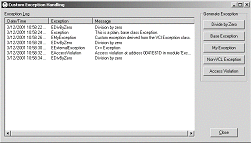
I’ve written a sample application that creates a custom exception handler. Figure A shows this application after a few exceptions have been generated by clicking the buttons on the right side of the form. The custom exception handler logs all the exceptions to a TListView control.
A custom message box is displayed when a divide-by-zero exception is thrown. All other exceptions are passed on to the normal VCL exception handler. You can find this sample application on the Bridges Publishing Web site.
Figure A:
Sample application using a custom exception handler
The TApplication class has an event named OnException. To create a custom exception handler, all you need to do is write an exception handling function and assign that function to the OnException event.
Here is the VCL typedef for a function you can assign to OnException:
typedef void __fastcall
  (__closure *TExceptionEvent)
  (System::TObject* Sender,
  Sysutils::Exception* E);
In the sample application, I created a function in the TMainForm class that conforms to this typedef:
void __fastcall TMainForm::OnException(
  TObject* sender, Exception* exception)
{
  Log(exception);

  if (String(exception->ClassName())
        == "EDivByZero")
  {
    exception->Message += "\r\n\r\nYou"
      " shouldn't divide by zero!";
    Application->MessageBox(
      exception->Message.c_str(),
      "Whoa!", MB_OK | MB_ICONSTOP);
  }
  else
    Application->
      ShowException(exception);
}
I named this function OnException() and I assign it to the OnException event of TApplication in the form’s constructor with this line of code:
Application->OnException = OnException;As you can see, the OnException() function is not complicated. TApplication passes in a pointer to an Exception object. First, I log the exception by calling a function, Log(), with this pointer. Log() is another simple function that adds the name of the exception class, the text message associated with the exception, and the date and time to a TListView.
Next, I test the exception to determine if its class name is EDivByZero. If it is, I display a custom message box. If the exception in not of type EDIvByZero, I invoke the default VCL exception handler by calling the ShowException() function in TApplication.
There are three different types of exceptions that might occur in a Windows program: a VCL exception, a C++ exception, or a Windows structured exception. The VCL converts all of these to VCL exceptions. VCL exceptions are all derived from the VCL Exception class. In the sample application, I have written code to throw all three types.
The sample application will throw two different VCL exceptions: one using the base class Exception and one using an exception class I created, EMyException. Here is the code that causes these two exceptions:
throw Exception("This is a plain, "
  "base class Exception.");
and
throw EMyException();The EMyException class is derived from the Exception class:
class EMyException : public Exception
{
  public:
    EMyException() : Exception(
      "Custom exception derived from "
      "the VCl Exception class.") {}
};
Two Windows structured exceptions are generated: attempting to divide by zero, and attempting to use a NULL pointer to call a function. The VCL converts these into the VCL exception EDivByZero and EAccessViolation respectively. Here is the code I use to cause the divide by zero exception:
int a = 0, b = 3;
int c = b / a;
b = c;
The code I used to cause the invalid pointer exception is as follows:
TForm *badPtr = 0;
badPtr->Close();
Both of these classes are derived from EExternal (which is derived from Exception). EExternal is the VCL class that captures Windows structured exceptions.
The sample application also throws an int to demonstrate how the VCL handles a plain C++ exception:
throw 12;The VCL converts this exception into an EExternalException. The EExternalException class is derived from EExternal and represents an exception that the VCL does not recognize. The VCL does not preserve the value of the int, in this case 12, when it converts the exception to EExternalException.
Version 5 of C++Builder has a handy new component named TApplicationEvents. You can find this component on the Additional tab of the Component Palette. This component makes creating handlers for events in TApplication, such as OnException, even easier.
Just drop a TApplicationEvents component on your form, click on the Events tab of the Object Inspector and then double-click on the OnExceptions event. The IDE will create the skeleton of an exception handler function for you.
A custom exception handler assigned to the OnException event of TApplication will handle all of the exceptions thrown in application with a couple of exceptions (pun intended). For TApplication to catch an exception and fire the OnException event, the exception must occur within the scope of the Run() method in TApplication. If an exception is thrown before Run() is called or after Run() has returned, the OnException event will not occur.
Listing A: Main unit for the Exception example program.
#include <vcl.h>
#pragma hdrstop

#include <except.h>

#include "Main.h"

#pragma package(smart_init)
#pragma resource "*.dfm"

TMainForm *MainForm;


__fastcall TMainForm::TMainForm(
  TComponent* Owner) : TForm(Owner)
{
  Caption = Application->Title;

  sortType = 0;
  sortAscending = true;

  Application->OnException = OnException;
}

void __fastcall TMainForm::CloseBtnClick(
  TObject *Sender)
{
  Close();
}

void __fastcall TMainForm::ZeroBtnClick(
  TObject *Sender)
{
  int a = 0, b = 3;
  int c = b / a;
  b = c;
}

void __fastcall TMainForm::OnException(
  TObject* sender, Exception* exception)
{
  Log(exception);

  if (String(exception->ClassName())
        == "EDivByZero")
  {
    exception->Message += "\r\n\r\nYou really "
      "shouldn't divide by zero!";
    Application->MessageBox(
      exception->Message.c_str(), "Whoa!",
      MB_OK | MB_ICONSTOP);
  }
  else
    Application->ShowException(exception);
}

void __fastcall TMainForm::Log(
  Exception *exception)
{
  TListItem *item = LogListView->Items->Add();
  item->Caption = Now().DateTimeString();

  item->SubItems->Add(exception->ClassName());
  item->SubItems->Add(exception->Message);
}

void __fastcall TMainForm::BaseBtnClick(
  TObject *Sender)
{
  throw Exception(
    "This is a plain, base class Exception.");
}

void __fastcall TMainForm::LogListViewColumnClick(
  TObject *Sender, TListColumn *Column)
{
  if (sortType == Column->Tag)
    sortAscending = !sortAscending;
  else
  {
    sortAscending = true;
    sortType = Column->Tag;
  }

  LogListView->AlphaSort();
}

void __fastcall TMainForm::LogListViewCompare(
  TObject *Sender, TListItem *Item1,
  TListItem *Item2, int Data, int &Compare)
{
  int sortDir = sortAscending ? 1 : -1;

  TDateTime d1(Item1->Caption);
  TDateTime d2(Item2->Caption);
  int cd = d1 < d2 ? - 1 : d1 > d2 ? 2 : 0;

  switch (sortType)
  {
    case 0:
      Compare = cd;
      break;
    case 1:
    {
      int c = CompareText(
        Item1->SubItems->Strings[0],
        Item2->SubItems->Strings[0]);
      Compare = c == 0 ? cd : c;
      break;
    }
    case 2:
    {
      int c = CompareText(
        Item1->SubItems->Strings[1],
        Item2->SubItems->Strings[1]);
      Compare = c == 0 ? cd : c;
      break;
    }
  }

  Compare *= sortDir;
}

void __fastcall TMainForm::MyBtnClick(
  TObject *Sender)
{
  throw EMyException();
}

void __fastcall TMainForm::NonVCLBtnClick(
  TObject *Sender)
{
  throw 12;
}

void __fastcall TMainForm::AccessBtnClick(
  TObject *Sender)
{
  TForm *badPtr = 0;
  badPtr->Close();
}