I recently saw some source code to log the activity of a program written to use the Borland’s Visual Component Library (VCL). I was very surprised to see a couple of hundred lines of code to determine which form and control were active and to log that information to a file. It used very complicated calls to the Windows API and code searches through lists of TComponent objects.
While the code was very well written, there was absolutely no reason for a programmer to expend that much effort. Borland has done nearly all the work for you. Using the TScreen class you can instantly tell which form and control are active. Also, you can be notified, using events in TScreen, when the active form or control changes.
If you add in a couple of events from the TApplication class, you can also tell when the application is activated or deactivated.
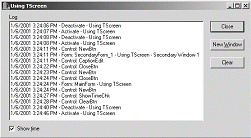
The code in Listing A is taken from a demonstration program I wrote. You can find this program and its complete source code on the Bridges Publishing Web site. Figure A shows the program’s main form with the events that were logged.
Figure A
The demonstration program with events logged.
Let me explain how this code works. The program has a main form with a few controls; including a button that will create child forms that also have a few controls. Whenever the active control or form changes, the program writes an entry into a TMemo object that I have named LogMemo. If the program is activated or deactivated, a line will be written to LogMemo indicating which of those events happened.
Writing to LogMemo is accomplished with the simple function Log(). This function could be easily changed to write information to a file for a more permanent record of events.
Whenever you build a program using the VCL, the VCL creates a TApplication object and assigns a pointer to that object to the global variable named Application. You probably knew this. What you might not know is that a TScreen object is also created and a pointer to this object is assigned to the global variable Screen. I’ll use events in TApplication and TScreen and properties in TScreen to get all the information I need to log events.
Lets take a look at TApplication first. TApplication has two events, OnActivate and OnDeactivate. These events do exactly what you would expect. They fire when the application is either activated or deactivated. I wrote two functions, ActivateApplication() and DeactivateApplication(), to be assigned to these events in the main form’s constructor. These two functions merely call Log() with the text that indicates what happened.
Using TScreen is also very simple. TScreen contains two events that I used, OnActiveFormChange and OnActiveControlChange. The OnActiveFormChange event fires whenever the active form in the application changes. Similarly, OnActiveControlChange fires when the active control changes. I assigned the functions FormChange() and ControlChange() to these two events in the main form’s constructor.
In the FormChange() function, I use the ActiveForm property of TScreen to determine which form is active and call the Log() function with a string containing the Caption property of that form.
The ControlChange() function uses the TScreen property, ActiveControl, to report a control change. I use the Name property of the active control to identify it in a call to the Log() function.
Notice what I do in the main form’s destructor. I assign 0 to the TApplication and TScreen events. If I didn’t, the program would crash. Both TApplication and TScreen are destroyed after the main form. So, when the main form is destroyed events that are connected to changes in controls and forms will fire. Since the code that these events try to use is contained in the main form, which no longer exists, bad things can happen.
I am sure you have run into TApplication in the past. You may not be as familiar with TScreen. I have just touched on one small use for TScreen. There is a lot of good information and useful functionality in this VCL class. Take a look at the online help to see what else you can do with TScreen.
Listing A: Code for logging application, form and control events.
__fastcall TMainForm::TMainForm(
  TComponent* Owner) : TForm(Owner)
{
  Application->OnActivate = ActivateApplication;
  Application->OnDeactivate =
    DeactivateApplication;

  Screen->OnActiveFormChange = FormChange;
  Screen->OnActiveControlChange = ControlChange;
}

__fastcall TMainForm::~TMainForm()
{
  Screen->OnActiveControlChange = 0;
  Screen->OnActiveFormChange = 0;

  Application->OnActivate = 0;
  Application->OnDeactivate = 0;
}

void __fastcall TMainForm::Log(String text)
{
  if (ShowTimeChk->Checked)
    text.Insert(Now().DateTimeString() +
      " - ", 1);
   LogMemo->Lines->Add(text);
}

void __fastcall TMainForm::FormChange(
  TObject *Sender)
{
  Log("Form: " + Screen->ActiveForm->Name + " - "
    + Screen->ActiveForm->Caption);
}

void __fastcall TMainForm::ControlChange(
  TObject *Sender)
{
  Log("Control: " + Screen->ActiveControl->Name);
}

void __fastcall TMainForm::ActivateApplication(
  TObject *Sender)
{
  Log("Activate - " + Application->Title);
}

void __fastcall TMainForm::DeactivateApplication(
  TObject *Sender)
{
  Log("Deactivate - " + Application->Title);
}