The TRichEdit control included in the VCL does a nice job of encapsulating the Windows rich edit control. However, it leaves out a lot of the functionality found in more recent versions of this control.
In this article I am going to show you how to display a working or hot link URL in a TRichEdit component. If you left-click this URL, your Web browser will be launched and the link will be loaded into the browser.
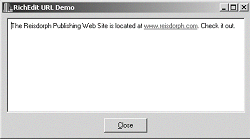
I’ve written a sample application that demonstrates this. Figure A shows this application with a link to the URL www.bridgespublishing.com, the Reisdoprh Publishing Web site. By clicking on this underlined link, your browser should launch and display the home page for this site.
Let’s cook up some hot links.
Figure A: Sample application showing a hot URL link in a rich edit control
For the code described in this article to display a hot link, you will need to have version 2.0 or greater of the Windows rich edit control. If you use this code on a computer that has version 1.0, TRichEdit will still display the link as ordinary text.
You could test for the version of the rich edit control, but it really isn’t necessary since the code is designed to run on any version of the rich edit control. You will just lose the hot link functionality on version before 2.0.
The relevant code from the sample application is shown in Listing A. There is a TRichEdit component, named RichEdit1 on the TMainForm form. In the form’s constructor, I get the event mask for RichEdit1 by sending an EM_GETEVENTMASK message to the component. I then add the ENM_LINK event to the value of the mask and set the new mask in RichEdit1 by sending it to RichEdit1 with an EM_SETEVENTMASK message.
The event mask tells the rich edit control which messages it should send when things happen in the control. Once ENM_LINK is included in the mask, the EN_LINK message is sent when a link (URL) is clicked with the mouse.
In the form’s constructor, I also send RichEdit1 an EM_AUTOURLDETECT message. This tells the control that it should examine the text that is entered into it and automatically determine if the text is a link or URL.
Finally, I assign some text to RichEdit1 that contains a link, www.bridgespublishing.com.
All that’s left to do is catch any EN_LINK messages that are sent to the application and act on those messages. I do that by overriding the virtual function WinProc() found in TForm.
In this function, I look for any WM_NOTIFY messages that contain the code EN_LINK. If such a message is received, the lParam member of the message will be a pointer to an ENLINK struct. Here is the definition for this struct:
typedef struct _enlink
{
  NMHDR nmhdr;
  UINT msg;
  WPARAM wParam;
  LPARAM lParam;
  CHARRANGE chrg;
} ENLINK;
I examine the msg member of the ENLINK struct and if it is equal to WM_LBUTTONDOWN, then a link has been clicked with the left button of the mouse.
The chrg member of the ENLINK struct contains the range of characters that make up the link. I select the characters by sending an EM_EXSETSEL message to RichEdit1 with this range.
Now the text that makes up the link is accessible through the SelText property of RichEdit1. I use this text as input to the ShellExecute() function of the Windows API. The ShellExecute() function will take care invoking the browser.
All other messages to WinProc() are passed on to TForm::WinProc().
If you try to look up the structs and messages from the Windows API in the online help included with C++Builder, you won’t find them. They are not secret though. Look on the Microsoft Developer Network Web site, www.msdn.Microsoft.com and do a search for them there.
Listing A: Code to display a hot link in a TRichEdit component
__fastcall TMainForm::TMainForm(
  TComponent* Owner) : TForm(Owner)
{
  unsigned mask = SendMessage(RichEdit1->Handle,
    EM_GETEVENTMASK, 0, 0);
  SendMessage(RichEdit1->Handle, EM_SETEVENTMASK,
    0, mask | ENM_LINK);
  SendMessage(RichEdit1->Handle, EM_AUTOURLDETECT,
    true, 0);

  RichEdit1->Text = "The Bridges Publishing Web"
    " Site is located at www.bridgespublishing.com. Check"
    " it out.";
}

void __fastcall TMainForm::WndProc(
  Messages::TMessage &Message)
{
  if (Message.Msg == WM_NOTIFY)
  {
    if (((LPNMHDR)Message.LParam)->code ==EN_LINK)
    {
      ENLINK* p = (ENLINK *)Message.LParam;
      if (p->msg == WM_LBUTTONDOWN)
      {
        SendMessage(RichEdit1->Handle,
          EM_EXSETSEL, 0, (LPARAM)&(p->chrg));
        ShellExecute(Handle, "open",
          RichEdit1->SelText.c_str(), 0, 0,
          SW_SHOWNORMAL);
      }
    }
  }

  TForm::WndProc(Message);
}