All components that descend from the TPersistent class have the ability to be saved to and loaded from a file. (This streaming ability is primarily what makes the TPersistent class unique from the TObject class.) In this article, I’ll show you how to exploit this feature to easily save and load an image list to and from a file.
The VCL provides a simple function that you can use to save any TComponent to a file: WriteComponentResFile(). Here’s how it’s declared:
void __fastcall WriteComponentResFile(
  const AnsiString FileName,
  TComponent* Instance);
The WriteComponentResFile() function takes two parameters: an AnsiString that specifies the name of the file to save the component to, and a pointer to the TComponent instance that you want to save. Here’s an example that uses the WriteComponentResFile() function to save a TImageList to a file:
void __fastcall SaveImageList(
   AnsiString filename,
   TImageList* ImageList)
{
  // write ImageList to a file
   WriteComponentResFile(
    filename, ImageList);
}As you might have guessed, there is a complementary function that can be used to load a TComponent instance from a file: ReadComponentResFile():
TComponent* __fastcall
  ReadComponentResFile(
    const AnsiString FileName,
    TComponent* Instance);
The ReadComponentResFile() function also accepts two parameters. The first parameter specifies the name of the file from which to load the component. The second parameter specifies a pointer to an instance of the component into which you want the stored data read. Here’s an example that uses the ReadComponentResFile() function to load a TImageList object from a file:
#include <memory>
TImageList* __fastcall LoadImageList(
  TComponent* Owner,AnsiString filename)
{
  // create a new TImageList object
  std::auto_ptr<TImageList>
    ImageList(new TImageList(Owner));

  // read the data into ImageList
  ReadComponentResFile(
    filename, ImageList.get());

  // return a pointer to ImageList
  return ImageList.release();
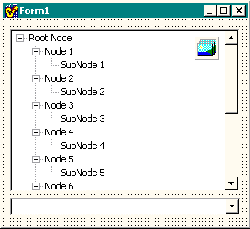
}Let’s work through an example that uses the LoadImageList() function. Figure A depicts a form that contains a combo box (ComboBox1), a tree view (TreeView1), and an image list (ImageList1). The goal is to change the icons that the tree view uses (i.e., the icons held in ImageList1) depending on which item is selected in the combo box. The combo box simply contains the strings “Style 1”, “Style 2”, and “Style 3”). Assuming that you’ve already used the SaveImageList() function to save three TImageList objects to three files: “imglist_style1.dat", “imglist_style2.dat”, and “imglist_style3.dat”, here’s the code that you’d place in ComboBox1’s OnChange event handler:
void __fastcall TForm1::
  ComboBox1Change(TObject *Sender)
{
  AnsiString filename;
  switch (ComboBox1->ItemIndex)
  {
    case 0:
      filename = "imglist_style1.dat";
      break;
    case 1:
      filename = "imglist_style2.dat";
      break;
    case 2:
      filename = "imglist_style3.dat";
      break;
  }

  // disassociate the image list
  TreeView1->Images = NULL;

  // delete the current image list
  delete ImageList1; ImageList1 = NULL;

  // load the new image list
  ImageList1 =
    LoadImageList(this, filename);

  // associate the image list
  TreeView1->Images = ImageList1;
}
Figure A
A form with an image list, a tree-view, and a combo box. The contents of the image list will change depending on which item is selected in the combo box.
The VCL streaming system makes saving and loading an image list fairly simple. There are, however, a couple of caveats that you should be aware of. First, because the ReadComponentResFile() function uses the FindUniqueName() function, the Name of the TImageList will change each time it’s loaded. If you use code that relies on the Name of your TImageList, you’ll have to restore the name manually. In addition, if you have an OnChange event handler assigned to your image list, you’ll have to reassign it after calling the LoadImageList() function.
I should mention that Windows does provide its own mechanism for loading and saving an image list to and from a file; namely, you can use the ImageList_Write() and ImageList_Read() API functions. These functions aren’t as user-friendly as WriteComponentResFile() and ReadComponentResFile() however, because they require the use of an OLE document. (Please feel free to email me if you need an example of using the ImageList_Write() and ImageList_Read() functions.)