Most components you write are derived from one of the VCL components or classes. A button component, for example, might be derived from TCustomButton or TButton. This is the traditional way of writing components, and many component writers never venture beyond this type of component.
Sometimes, however, you need a more complex component. One such type of component uses aggregation to build a single component by implementing one or more existing components. This article will show the basics of creating aggregate components and will address some of the problems that can arise.
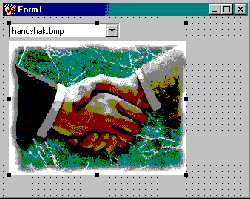
The example component for this article is called TPictureSelector. This component combines a TComboBox component and a TImage component into a single component. The combo box contains a list of bitmap files. When a bitmap file in the combo box is selected, it is shown in the image component. Figure A shows this component on a form at design time.
Figure A
The PictureSelector component combines the TComboBox and TImage components into a single component.
TPictureSelector is derived from TWinControl. TWinControl provides is the base class for all windowed controls. Listings A and B show the header and source for TPictureSelector.
This component doesn’t contain a lot of code. The component is nowhere near what I would call finished, but it does what it is advertised to do and that’s all that counts for now. In order for this component to be finished I should, at a minimum, resurface some of the TComboBox and TImage events. For example, I should have an OnSelectionChanged event that simply passes on the combo box’s OnClick event.
TPictureSelector declares two variables in its private section:
private:
  TComboBox* FComboBox;
  TImage* FImage;
In the component’s constructor these two components are dynamically created, given some default values, and positioned. Here’s the constructor of TPictureSelector:
__fastcall TPictureSelector::
  TPictureSelector(TComponent* Owner)
  : TWinControl(Owner)
{
  Width = 240;
  Height = 205;
  FComboBox = new TComboBox(this);
  FComboBox->Left = 0;
  FComboBox->Top = 0;
  FComboBox->Width = 150;
  FComboBox->Style = csDropDownList;
  FComboBox->OnClick = ComboBoxClick;
  FComboBox->Parent = this;
  FImage = new TImage(this);
  FImage->Left = 0;
  FImage->Top = FComboBox->Height + 1;
  FImage->Width = Width;
  FImage->Height =
    Height - FComboBox->Height + 1;
  FImage->Parent = this;
}
First the component itself is set to a default size of 240 pixels wide and 200 pixels high. These are somewhat arbitrary values. I knew I would be using the splash images installed with C++Builder and that the images were 180 by 240 pixels in size. Every component has a default size and this code shows how to set the default size for a component.
Next I create the combo box dynamically and set some of its properties:
FComboBox = new TComboBox(this);
FComboBox->Left = 0;
FComboBox->Top = 0;
FComboBox->Width = 150;
FComboBox->Style = csDropDownList;
FComboBox->OnClick = ComboBoxClick;
FComboBox->Parent = this;
Notice that I set the Top and Left properties to 0. The TPictureSelector will be the parent of the combo box and, as such, the position 0,0 is the top left corner of the component. I set the Width property to an arbitrary value of 150 pixels. I thought the component looked better this way rather than having the combo box extend across the full width of the component.
Now turn your attention to the line of code that assigns the OnClick event:
FComboBox->OnClick = ComboBoxClick;This code assigns the combo box’s OnClick event to a function called ComboBoxClick(). Here is the ComboBoxClick() function:
void __fastcall UnlPictureSelector::
  ComboBoxClick(TObject* Sender)
{
  int index = FComboBox->
    Items->IndexOf(FComboBox->Text);
  FImage->Picture->
    LoadFromFile(Strings[index]);
}
When the combo box is clicked, the ComboBoxClick() function is called and the bitmap associated with the selected combo box item is loaded into the image component. Without providing an internal handler for the combo box’s OnClick event I would have no way of knowing when the combo box selection changed.
It’s important to understand that by using the combo box’s OnClick event internally, I am making it impossible for the user to access this event in the finished component. It’s sort of a moot point because I haven’t made the combo box component public so the user has no way of getting to the event anyway. The solution in this case would be to provide a new event that emulates the combo box’s OnClick event.
Finally, notice the line of code that assigns the TPictureSelector as the combo box’s parent:
FComboBox->Parent = this;I’ve mentioned this in past articles, but without this line of code the combo box would never show itself. Forgetting this one line of code has left many new component writers scratching their heads wondering why the child component isn’t visible.
The rest of the code in the constructor creates the image component and gives its properties default values. The bulk of the code is positioning and sizing code. I position the TImage component on the left edge, and just below the combo box. I size the image component so that it fills the remainder of the TPictureSelector component.
You may have noticed that the TPictureSelector component does not have a destructor. If you are new to the VCL you might think that I have violated the rules of object oriented programming by not deleting the objects I allocated with operator new. I don’t need to delete the objects because the VCL will do it for me. When the TPictureSelector component is destroyed, the VCL will automatically destroy the TComboBox and TImage objects.
A situation often arises when using aggregate components. In this component I am filling the combo box with a list of strings contained in a const variable called Strings. Most component writers’ first thought is to fill the combo box with strings in the component’s constructor. The problem with this approach is that the combo box doesn’t have a window handle at this point in the creation process. Attempting to call any methods of the combo box that require a window handle will result in an exception at runtime that says:
Control has no parent window.This somewhat cryptic message is telling you that you are attempting to access some portion of the combo box that requires a window handle and that the window handle has not yet been created. The solution is to override the CreateWnd() method. When the base class CreateWnd() returns, all of the components have been created and the window handle is valid. Here’s my overridden CreateWnd():
void __fastcall
  TPictureSelector::CreateWnd()
{
  TWinControl::CreateWnd();
  for (int i=0;i<6;i++)
    FComboBox->Items->Add(Strings[i]);
  FComboBox->ItemIndex = 0;
  ComboBoxClick(0);
}
First I call the base class’s CreateWnd() function. After the base class’s CreateWnd() function returns I know that I have a valid window handle for the combo box and I can add the strings to it. I also set the ItemIndex property to 0 so that the combo box displays the first item when the program runs. Without this step the combo box selection would be blank on program startup. The last line of code calls the ComboBoxClick() function to display the bitmap in the Image component.
In the last line of code in the preceding code example I call the ComboBoxClick function like this:
ComboBoxClick(0);I pass 0 for the Sender parameter because I’m not doing anything with Sender in the ComboBoxClick function. In other words, it doesn’t matter one bit what I pass in the Sender parameter because ComboBoxClick doesn’t use the parameter. Some folks would be more comfortable if I had called the function like this:
ComboBoxClick(this);Sender is a TObject pointer so passing 0 is just as good as passing this so long as I know that I’m not using the parameter in the ComboBoxClick function.
I can just about guarantee that you’ll get the “Component has no parent window” exception at some point. Remembering this one tidbit regarding CreateWnd() may save you hours of frustration when that time comes.
When writing aggregate components, you have to decide which of the child components’ properties, methods, and events you will surface in the aggregate component.
In some cases you won’t surface any of the child components’ properties, methods, and events. Instead, you would keep them hidden from the user.
In other cases you may surface some or all of the properties, methods, and events in order to allow the user to interact with the individual child components. In fact, you may choose to allow access to the child components in their entirety by making them public or published properties of the aggregate component.
The TPictureSelector component doesn’t expose the child components, nor does it expose any of their properties, methods, or events. This is due to the fact that this component is a simple example and really doesn’t do anything meaningful. The point is that you have to give careful consideration to how the component will be used and expose child component properties, methods, and events as needed.
Creating aggregate components raises issues you don’t have to face when writing standard components.
Listing A: Declaration of the TPictureSelector class
#ifndef PictureSelectorH
#define PictureSelectorH

#include <SysUtils.hpp>
#include <Controls.hpp>
#include <Classes.hpp>
#include <Forms.hpp>

const String Strings[] = {
  “handshak.bmp”,
  “factory.bmp”,
  “chemical.bmp”,
  “shipping.bmp”,
  “finance.bmp”
};

class PACKAGE TPictureSelector :public TWinControl
{
private:
  TComboBox* FComboBox;
  TImage* FImage;
protected:
  void __fastcall ComboBoxClick(TObject* Sender);
  virtual void __fastcall CreateWnd();
public:
  __fastcall TPictureSelector(TComponent* Owner);
};

#endif
Listing B: Definition of the TPictureSelector class
#include <vcl.h>
#pragma hdrstop

#include “PictureSelector.h”
#pragma resource “PictureSelector.res”
#pragma package(smart_init)

__fastcall TPictureSelector::TPictureSelector(
  TComponent* Owner) : TWinControl(Owner)
{
  Width = 240;
  Height = 205;
  FComboBox = new TComboBox(this);
  FComboBox->Left = 0;
  FComboBox->Top = 0;
  FComboBox->Width = 150;
  FComboBox->Style = csDropDownList;
  FComboBox->OnClick = ComboBoxClick;
  FComboBox->Parent = this;
  FImage = new TImage(this);
  FImage->Left = 0;
  FImage->Top = FComboBox->Height;
  FImage->Width = Width;
  FImage->Height = Height - FComboBox->Height;
  FImage->Parent = this;
}

void __fastcall TPictureSelector::CreateWnd()
{
  TWinControl::CreateWnd();
  for (int i=0;i<6;i++)
    FComboBox->Items->Add(Strings[i]);
  FComboBox->ItemIndex = 0;
  ComboBoxClick(0);
}

void __fastcall TPictureSelector::ComboBoxClick(
  TObject* Sender)
{
  int index =
    FComboBox->Items->IndexOf(FComboBox->Text);
  FImage->Picture->LoadFromFile(Strings[index]);
}

namespace Pictureselector
{
  void __fastcall PACKAGE Register()
  {
    TComponentClass classes[1] =
      {__classid(TPictureSelector)};
    RegisterComponents(“Samples”, classes, 0);
  }
}