If you have read many of my articles, you’ll know that I am still surprised and pleased at how easy C++Builder makes coding many projects. You’ll also know that I like creating components for reuse. In this article, I’m going to show you a component that I created to generate monthly calendar pages in HTML. And guess what? It was very easy to create!
I used the IDE’s Component Wizard to write the skeleton code for a new component, THTMLCalendarGenerator, derived from TComponent. Then I added only about 150 lines of code and ended up with a very useful component.
I was asked by a client, a medical clinic, to help them convert data from their scheduling system into a monthly calendar they could display on their Web site. The calendar would show which days doctors were scheduled to work at each of their offices.
I wrote the code to extract the data I needed for each month, and then wrote some code to format that data into HTML code that would display a monthly calendar.
I noticed that the code to generate the HTML calendar was fairly generic. That is, the code was not specific to this one project. It was also encapsulated in a single C++ class. This made a little bell go off in my head that rang “component”. So, I created the component presented in this article. A component I am sure I can reuse in other projects.
The code for THTMLCalendarGenerator is in Listings A and B. THTMLCalendarGenerator is a non-visual component, derived from TComponent.
There are three published properties, Month, Year and Title. The Month and Year properties specify the month the calendar will depict and the Title property holds text that will be displayed at the top of the calendar.
There is one event, OnGetEvent, which allows the programmer using THTMLCalendarGenerator to add text to specific days of the calendar. I’ll explain how that works later when I discuss the demo program. For now, don’t be confused by the Event part of OnGetEvent. This means a calendar event, something that occurs on a specific date. It doesn’t mean an event in the C++Builder sense of the word.
Once the HTML code has been generated, it can be saved to a stream or file using the SaveToStream() and SaveToFile() methods. Or, the code can be retrieved as an AnsiString through the public property, HTML.
The actual generation of the code occurs when the protected method Generate() is called. THTMLCalendarGenerator generates the HTML code in a lazy manner. This means that the code is not generated until it is needed. This is a technique that can be very efficient. You can see how this works by looking at the methods SetMonth() and SaveToFile().
The SetMonth() method is called when the Month property is assigned a value. The private data element month is assigned the value and the Boolean needsGenerating is set to true. However, the HTML code is not generated at this point.
When the SaveToFile() method is called, it first checks the value needsGenerating. If this value is true, then the Generate() method is called. If the value is false, the HTML code is up-to-date and does not need to be generated. Finally, SaveToFile() saves the HTML code to a file.
As you can see, the Generate() method sets needsGenerating to false. So, if nothing changes, a second call to SaveToFile() will not regenerate the HTML code.
Lets take a look at how the Generate() method works. This method uses the VCL component, TStringList. TStringList, an incredibly useful component, will provide the functionality for storing the HTML code and then writing that code out to a stream or file.
The calendar is simply an HTML table. The HTML code for this table and the rest of the HTML page is added to the TStringList on line at a time. Each time a new cell is added for a day of the month, the OnGetEvent event is called and any text returned by the event is added to the cell for that day.
The code for the HTMLCalendarGenerator component and the demonstration program can be found on the Bridges Publishing Web site.
Let’s take a look at how the demo program uses the HTMLCalendarGenerator component.
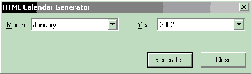
Figure A shows the demo program in action. This program allows you to choose a month and year for the calendar and then a click of the Generate… button lets you pick a file name and saves the HTML code to that file.
Figure A
The demonstration program.
In the IDE, I added an HTMLCalendarGenerator component to the form and filled in the properties for the component as seen in Figure B.
Figure B
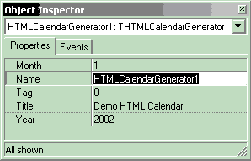
The properties for THTMLCalendarGenerator.
I filled in the form’s month and year combo boxes and set the initial values in the combo boxes in the form’s constructor with this code:
// Fill in month combo box
for (int i = 0; i < 12; i++)
  MonthCombo->Items->Add(
    LongMonthNames[i]);

// Fill in year combo box
for (int i = 0; i < NUM_YEARS; i++)
  YearCombo->Items->Add(START_YEAR + i);

MonthCombo->ItemIndex =
  HTMLCalendarGenerator1->Month - 1;
YearCombo->ItemIndex =
  HTMLCalendarGenerator1->Year –
    START_YEAR;
Notice that I used the VCL array LongMonthNames[], so that the names of the months will be locale specific. The variable START_YEAR is a const int that I set to 1999.
I tied the Month and Year properties of the HTMLCalendarGenerator component to the form’s combo boxes with this code:
void __fastcall TMainForm
  ::MonthComboChange(TObject *Sender)
{
  HTMLCalendarGenerator1->Month
    = MonthCombo->ItemIndex + 1;
}

void __fastcall TMainForm
  ::YearComboChange(TObject *Sender)
{
  HTMLCalendarGenerator1->Year
    = YearCombo->ItemIndex + START_YEAR;
}
Finally, I assigned the following function to the HTMLCalendarGenerator component’s OnGetEvent event:
void __fastcall TMainForm
  ::HTMLCalendarGenerator1GetEvent(
  TObject *Sender, TDateTime date,
  AnsiString &desc)
{
  unsigned short y, m, d;
  date.DecodeDate(&y, &m, &d);

  if (d == 1)
    desc = "The first day of the month";
  else if (d == 5)
    desc = "To subscribe <a href="
    "'http://www.bridgespublishing.com'>"
    "click here.</a>";
  else if (d == 13)
    desc =
      "This event<br>has two lines";
  else if (d == 22)
    desc = "Some <b>bold</b> text";
  else if (d == 31)
    desc = "This month has 31 days.";
}
This event is fired each time a day is added to the calendar. The day’s date and a reference to an AnsiString, desc, are passed to the event’s method. I test the day of the month and for certain days and I assign some text to desc for those days. Notice that some of the text I assign to desc, contains embedded HTML. You can use this to really spice up the calendar. In fact, you can even add graphics to the calendar this way. To add a picture of a flag to calendar for the Fourth of July you add this code to the functions above:
else if (date == TDateTime(2002, 7, 4))
  desc = “Happy Fourth of July”
+ “<img src=’../Pics/Flag.jpg’>”;I find the HTMLCalendarGenerator component to be very useful as it’s written. There are a few modifications you might want to consider, however. You might want to add properties to control the colors and the fonts used in the calendar. You might also want the component to generate the HTML table only and not the rest of the code for a complete HTML page.
If you are really ambitious, you could modify the component to generate calendars that cover ranges other than a single month. In any event, you have to admit that this component is both easy and useful.
Listing A: Definition of THTMLCalendarGenerator.
#ifndef HTMLCalendarGeneratorH
#define HTMLCalendarGeneratorH

#include <SysUtils.hpp>
#include <Controls.hpp>
#include <Classes.hpp>
#include <Forms.hpp>

typedef void __fastcall
  (__closure TGetCalendarEvent) (TObject* Sendr,
    TDateTime date, String &desc);

class PACKAGE THTMLCalendarGenerator
  : public TComponent
{
  __published:
    __property int Month =
      {read = month, write = SetMonth};
    __property String Title =
      {read = title, write = SetTitle};
    __property int Year =
      {read = year, write = SetYear};

    __property TGetCalendarEvent OnGetEvent =
      {read = onGetEvent, write = onGetEvent};

  public:
    __fastcall THTMLCalendarGenerator(
      TComponent* Owner);
    virtual __fastcall ~THTMLCalendarGenerator();
virtual void __fastcall SaveToFile(
const String fileName);
virtual void __fastcall
SaveToStream(TStream *stream);
__property String HTML = {read = GetHTML};
protected:
virtual void __fastcall Generate();
private:
String __fastcall GetHTML();
void __fastcall SetMonth(int m);
void __fastcall SetTitle(String t);
void __fastcall SetYear(int y);
int month, year;
TGetCalendarEvent onGetEvent;
TStringList *output;
bool needsGenerating;
String title;
};
#endif // HTMLCalendarGeneratorH
Listing B: Implementation of THTMLCalendarGenerator.
#include <vcl.h>
#pragma hdrstop

#include "HTMLCalendarGenerator.h"
#pragma package(smart_init)


__fastcall THTMLCalendarGenerator
  ::THTMLCalendarGenerator(TComponent*
  Owner) : TComponent(Owner)
{
  // Initially set date to next month
  unsigned short y, m, d;
  TDateTime date = IncMonth(Date(), 1);
  date.DecodeDate(&y, &m, &d);
  month = m;
  year = y;
  needsGenerating = true;
  onGetEvent = 0;
  output = new TStringList;
}

__fastcall THTMLCalendarGenerator
  ::~THTMLCalendarGenerator()
{
  delete output;
}
void __fastcall THTMLCalendarGenerator
::SaveToFile(const String fileName)
{
if (needsGenerating) Generate();
output->SaveToFile(fileName);
}
void __fastcall THTMLCalendarGenerator
::SaveToStream(TStream *stream)
{
if (needsGenerating) Generate();
output->SaveToStream(stream);
}
void __fastcall THTMLCalendarGenerator
::Generate()
{
output->Clear();
TDateTime startDate(year, month, 1);
TDateTime endDate = IncMonth(startDate, 1) - 1;
int days = endDate - startDate + 1;
int startCol = startDate.DayOfWeek() - 1;
int rowCount = (startCol + days + 6) / 7;
int cellCount = rowCount * 7;
// Begin HTML -------------------------
output->Add("<html>");
// HTML Header ------------------------
output->Add("<head>");
output->Add("<meta http-equiv="
"'Content-Type' content="
"'text/html'></meta>");
output->Add("<meta name='GENERATOR' "
"content='HTML Calendar Generator'>"
"</meta>");
output->Add("<title>" + title
+ FormatDateTime(" - mmmm yyyy",
startDate) + "</title>");
output->Add("</head>");
// HTML Body --------------------------
output->Add("<body>");
// Calendar Title ---------------------
output->Add("<table border='1' "
"width='100%' cellspacing='0' "
"cellpadding='5'>");
output->Add("<tr>");
output->Add("<td height='80' "
"colspan='7' valign='bottom' "
"align='center'><h2>"
+ FormatDateTime("mmmm yyyy",
startDate) + "</h2>");
output->Add("<h3>" + title
+ "</h3></td>");
output->Add("</tr>");
// Day of Week Titles -----------------
output->Add("<tr>");
for (int i = 0; i < 7; i++)
output->Add("<td width='14%' "
"align='center' valign='middle'>"
"<font size='2'>"
+ LongDayNames[i]
+ "</font></td>");
output->Add("</tr>");
// Fill in Calendar -------------------
TDateTime date = startDate;
for (int i = 0; i < cellCount; i++)
{
if (i % 7 == 0) output->Add("<tr>");
if (i >= startCol && i < startCol + days)
{
output->Add("<td valign='top' align='left'>");
output->Add("<font size='2'>"
+ FormatDateTime("d", date)
+ "</font><p>"
"<font size='1'>");
String event = " ";
if (onGetEvent)
onGetEvent(this, date, event);
output->Add(event);
output->Add("</font></td>");
date++;
}
else
output->Add("<td valign='top' "
"align='left' "
"bgcolor='#EEEEEE'>"
"<font size='1'> </font>"
"</td>");
if ((i + 1) % 7 == 0)
output->Add("</tr>");
}
// End Calendar Table -----------------
output->Add("</table>");
// End HTML Body ----------------------
output->Add("</body>");
// End HTML ---------------------------
output->Add("</html>");
needsGenerating = false;
}
String __fastcall
THTMLCalendarGenerator::GetHTML()
{
if (needsGenerating)
Generate();
return(output->Text);
}
void __fastcall THTMLCalendarGenerator
::SetMonth(int m)
{
if (m == month) return;
if (m < 1 || m > 12)
{
String msg =
String(m) + " is not a valid month.";
throw EConvertError(msg);
}
month = m;
needsGenerating = true;
}
void __fastcall THTMLCalendarGenerator
::SetTitle(String t)
{
if (title == t) return;
title = t;
needsGenerating = true;
}
void __fastcall THTMLCalendarGenerator
::SetYear(int y)
{
if (y == year)
return;
if (y < 1900 || y > 3000)
{
String msg =
String(y) + " is not a valid year.";
throw EConvertError(msg);
}
year = y;
needsGenerating = true;
}
// Component stuff -----------------------
namespace Htmlcalendargenerator
{
void __fastcall PACKAGE Register()
{
TComponentClass classes[1] =
{__classid(THTMLCalendarGenerator)};
RegisterComponents("BCBJournal", classes, 0);
}
}