Captions are ubiquitous in Windows applications. However, on certain occasions, you might not want to display a caption for a window.
For instance, you may want to create a splash screen during application startup or a full-screen window that obscures everything else onscreen (as some installation applications do). In this article, we'll show you two ways you can create forms that don't display captions.
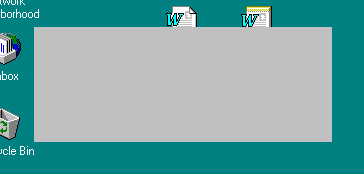
Figure A: If you set a form's BorderStyle property to bsNone, the form's borders will disappear.
Obviously, you don't encounter many situations in which you want to display a truly borderless form. One exception to this convention is a full-screen form that you might use to intentionally obscure the other windows on the system, such as a screen saver.
To see this type of form in action, create a blank-form project. Then, set the form's BorderStyle property to bsNone and the Color property to clBlack. Next, create an OnKeyDown event handler like the following:
void__fastcall TForm1::FormKeyDown(TObject*Sender, WORD &Key, TShiftState Shift)
{
  Close();
}
Finally, create an OnCreate event handler like this one:void__fastcall TForm1::FormCreate(TObject *Sender)
{
Top = 0;
Left = 0;
Width = Screen->Width;
Height = Screen->Height;
Cursor = crNone;
}
This code resizes the form to the screen's dimensions, then hides the mouse cursor. Build and run the application to confirm that it turns the screen black and doesn't display its border. Params.Styleparameter field; however, this isn't an intuitive change. As with many attribute adjustments using Windows API functions, the different styles you can combine in the
Params.Stylefield interact in some surprising ways. To achieve the desired effect (a captionless form), we must modify the style in a deliberate manner.
The WS_POPUP style specifies a standard window that may or may not have a caption and a border. In contrast, the WS_DLGFRAME style specifies only that the window must have a caption.
Since the standard border styles typically provide some sort of border (with the exception of bsNone), we can take the initial style settings (which come from the BorderStyle property) and modify them using the other two styles. Combining the WS_POPUP style with the default form style makes it possible for us to eliminate either the window border or the caption.
Next, we'll apply the WS_DLGFRAME style in reverse. That is, we'll invert this style and apply it to the existing style.
Now let's create a captionless form using this technique. First, create a blank-form project, and add the following
CreateParams()member function declaration to the private section of the form's class declaration. (Right-click on the code-editing window for the main form and choose Open Source/Header File from the pop-up menu to display the declaration.)
void__fastcall
CreateParams(TCreateParams &Params);
Then, add the following method body to the main form's source file:
void__fastcall TForm1::CreateParams(TCreateParams &Params)
{
  TForm::CreateParams(Params);
  Params.Style |= WS_POPUP;
  Params.Style ^= WS_DLGFRAME;
}
Finally, add the line shown in color to the form's OnClick event handler:
void__fastcall TForm1::FormClick(TObject *Sender)
{
  Close();
}
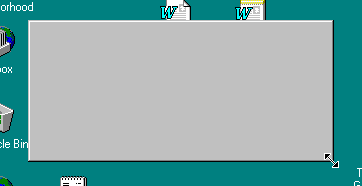
You're now ready to build and run the application. When the main form appears, you'll notice that it doesn't have a caption. However, it does have the standard, resizeable border, as shown in Figure B.
Figure B: You can override the CreateParams() member function to remove the caption from a standard form.
Click on the form to exit, change the form's BorderStyle property to another style, then build and run the application again. This time, the caption remains hidden, but the form's border will display the new border style.