Click on image to view full size.
If you find yourself using SQL (Structured Query Language) statements like the following:
SELECT *
FROM ORDERS
WHERE EmpNo='11'
OR EmpNo='12'
OR EmpNo='114'
then you may be using more keystrokes than you really need to. This query uses multiple criteria on a single field. In this article, we'll tell you about the SQL IN operator and how it can help you with SQL statements like the one above. We'll begin by defining situations in which you can use IN. Then, we'll show you how you can use the IN operator in place of other SQL statements.
SELECT fields
FROM table
WHERE field IN ('value', 'value', ...)
Now we can take the example SQL statement and rewrite it using an IN operator instead of multiple OR clauses. Simply drop the fields, table, and values into the IN syntax, as follows:
SELECT *
FROM Orders
WHERE EmpNo IN ('11', '12', '114')
This new statement performs the same query and looks better.
WHERE EmpNo IN ('11', '12', '114')
you can use a SELECT statement in place of ('11','12','114'). You can't use just any SELECT statement, however. The SELECT statement must return a single-column (or field) table. If the statement returns more than one column, the database engine will become confused because it won't know which column to use.
For example, consider the following legal SELECT statement:
SELECT EmpNo
FROM Employee
WHERE Salary > 40000
This SELECT returns a single column that contains EmpNo values where Salary is greater than $40,000.
You can plug this statement into our previous example to get a list of employee orders for employees whose salary is more than $40,000. To do so, use the following statement:
SELECT *
FROM Orders
WHERE EmpNo IN
( SELECT EmpNo
FROM Employee
WHERE Salary > 40000 )
It's important to note that the result set of the SELECT statement following IN must return a column whose data type is the same as the field that you're comparing. In other words, since EmpNo is an integer field, the SELECT statement must return a set of integers. If it returns a set of character fields, the database engine will respond with an error.
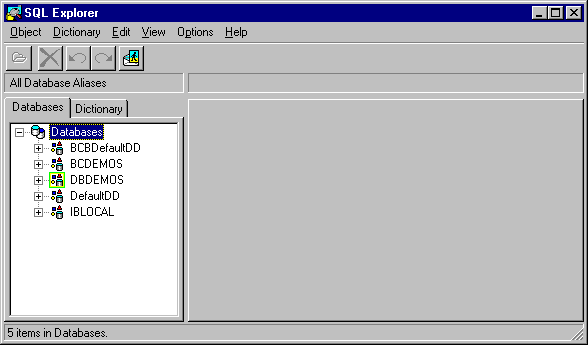
Figure A: You can use the SQL Explorer to run SQL queries.
Click on image to view full size.
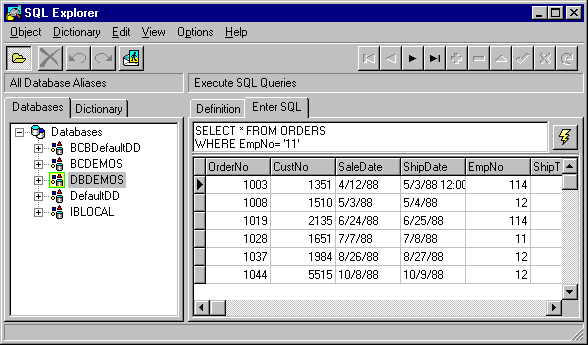
Select the DBDEMOS database in the Databases tree. Next, select the Enter SQL tab in the right-hand window. Type any of our sample SQL statements in the edit window and click the lightning bolt button to run the query. The results will appear in the window below the edit window, as shown in Figure B.
Figure B: C++Builder's SQL Explorer displays the SQL query results.
Click on image to view full size.
Brian Schaffneris the former editor-in-chief of Paradox for Windows Developer's Journal.