Did you ever wonder how you could get your hands on certain bitmaps found in Windows? Maybe your application has owner-drawn controls. Or, perhaps you’re writing a custom component and you need it to look as much as possible like a standard Windows control. The minimize button, maximize button, close button, scroll bar arrows, menu check marks--they all have to come from somewhere. But how do you get hold of them? In this article, we’ll show you their hiding places.
But LoadBitmap() can also extract the stock Windows bitmaps. The Win32 online help contains a complete list of bitmaps that you can obtain using LoadBitmap(), along with their constants. To obtain the flying Windows logo, for example, you could use code like the following:
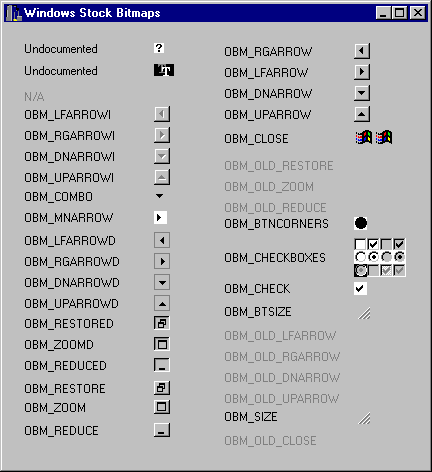
#includeThis code loads the bitmap identified by OBM_CLOSE (the close-box bitmap). Figure A shows a program that displays all the bitmaps available to you, along with their constant names. Note that some bitmap names begin with OBM_OLD. These bitmaps don’t display, because the constants are leftover from prior versions of Windows. If you want to use the resource names, then you must include the WINSRESRC.H file in which the constant names are defined.HBITMAP hBitmap = LoadBitmap(NULL, MAKEINTRESOURCE(OBM_CLOSE));
Figure A:Our example program shows all the stock Windows bitmaps.
Graphics::TBitmap* bm = new Graphics::TBitmap; bm->Handle = LoadBitmap(NULL, MAKEINTRESOURCE(OBM_CLOSE)); if (bm->Handle) Canvas->Draw(0, 0, bm); delete bm;This code loads the close-box bitmap from Windows and displays it in the upper-left corner of the form. Once you give the bitmap handle to VCL, you no longer have to worry about it--the TBitmap class will take care of freeing the resource. Listing A contains the paint routine we used to produce the program shown in Figure A. A quick look at this listing will show you how to load and display bitmaps in VCL.
void __fastcall TForm1::FormPaint(TObject *Sender)
{
TStringList* Names = new TStringList;
Names->Add(“Undocumented”);
Names->Add(“Undocumented”);
Names->Add(“N/A”);
Names->Add(“OBM_LFARROWI”);
Names->Add(“OBM_RGARROWI”);
Names->Add(“OBM_DNARROWI”);
Names->Add(“OBM_UPARROWI”);
Names->Add(“OBM_COMBO”);
Names->Add(“OBM_MNARROW”);
Names->Add(“OBM_LFARROWD”);
Names->Add(“OBM_RGARROWD”);
Names->Add(“OBM_DNARROWD”);
Names->Add(“OBM_UPARROWD”);
Names->Add(“OBM_RESTORED”);
Names->Add(“OBM_ZOOMD”);
Names->Add(“OBM_REDUCED”);
Names->Add(“OBM_RESTORE”);
Names->Add(“OBM_ZOOM”);
Names->Add(“OBM_REDUCE”);
Names->Add(“OBM_RGARROW”);
Names->Add(“OBM_LFARROW”);
Names->Add(“OBM_DNARROW”);
Names->Add(“OBM_UPARROW”);
Names->Add(“OBM_CLOSE”);
Names->Add(“OBM_OLD_RESTORE”);
Names->Add(“OBM_OLD_ZOOM”);
Names->Add(“OBM_OLD_REDUCE”);
Names->Add(“OBM_BTNCORNERS”);
Names->Add(“OBM_CHECKBOXES”);
Names->Add(“OBM_CHECK”);
Names->Add(“OBM_BTSIZE”);
Names->Add(“OBM_OLD_LFARROW”);
Names->Add(“OBM_OLD_RGARROW”);
Names->Add(“OBM_OLD_DNARROW”);
Names->Add(“OBM_OLD_UPARROW”);
Names->Add(“OBM_SIZE”);
Names->Add(“OBM_OLD_CLOSE”);
Graphics::TBitmap* bm = new Graphics::TBitmap;
int y = 20;
int x = 20;
int Offset;
Canvas->Brush->Style = bsClear;
for (int i = 1;i < 38;i++) {
bm->Handle =
LoadBitmap(NULL, MAKEINTRESOURCE(i + 32730));
if (bm->Handle) {
Canvas->Font->Color = clBlack;
Canvas->Draw(x + 130, y, bm);
Offset = (y + (bm->Height / 2)) - 6;
}
else {
Canvas->Font->Color = clGray;
Offset = y + 5;
}
Canvas->TextOut(x, Offset, Names->Strings[i - 1]);
if (bm->Height > 21) y += bm->Height + 5;
else y+= 21;
if (i > 18 && x == 20) {
y = 20;
x = 220;
}
}
delete bm;
delete Names;
}