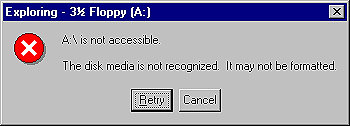
If your application uses floppy disks, then you should be prepared to handle any potential disk errors. A disk error occurs when there's no disk in a floppy drive, when a disk in the floppy drive isn't formatted, when the disk is damaged, or for many other reasons. Handling disk errors gracefully makes your application more robust and saves your users from endless frustration. In this article, we'll explain how to handle disk errors in your application. We'll also look at the SetErrorMode and GetLastError functions of the Windows API.
Figure A: Figure A shows an error message box for an unformatted disk (Windows NT
4).
While handling critical errors at the operating-system level is fine for many applications, some applications need better control of such errors. For example, if your application writes to diskette, you may want to suppress the normal Windows error message box in order to do some processing behind the scenes. Or maybe you just don't like the message boxes that Windows provides and you want to replace them with your own message boxes. Whatever the reason, you occasionally need to take control of critical errors from Windows.
SetErrorMode(SEM_FAILCRITICALERRORS);
After you've called this function, Windows will no longer handle critical errors. That's not the whole story, though. Make sure you save the old error mode and reset it when you're finished with a particular operation. We've done so in this example:
int OldMode;
OldMode = SetErrorMode(SEM_FAILCRITICALERRORS);
// Do some things that might cause an error and then reset the error mode.
SetErrorMode(OldMode);
As you might have surmised, SetErrorMode returns the previous error mode setting, thus allowing you to save the current error mode so you can restore it after you've completed a particular operation. Reset the error mode as soon as you've finished your processing. If you fail to do so, then the user may not receive notification of certain errors that are out of your control as a programmer. In short, do the following:
 | Set the error mode as desired.
| Do your thing.
| Set the error mode back to what it was before.
| |
By following this guideline, your applications can have custom error handling--yet not interfere with normal Windows operations. By the way, you can catch other errors besides critical errors. See the SetErrorMode topic in the Win32 API help file for complete information.
OldMode = SetErrorMode(SEM_FAILCRITICALERRORS);
CopyFile("test.dat", "A:\\test.dat", false);
int error = GetLastError();
// code to handle error here SetErrorMode(OldMode);
Since you could get any number of errors from this operation, you must be prepared to handle them all. For example, the CopyFile function in the previous example could result in any of the following errors:
ERROR_FILE_NOT_FOUND
ERROR_PATH_NOT_FOUND
ERROR_TOO_MANY_OPEN_FILES
ERROR_ACCESS_DENIED
ERROR_NOT_ENOUGH_MEMORY
ERROR_OUTOFMEMORY
ERROR_INVALID_DRIVE
ERROR_NOT_SAME_DEVICE
ERROR_NO_MORE_FILES
ERROR_WRITE_PROTECT
ERROR_BAD_UNIT
ERROR_NOT_READY
ERROR_CRC
ERROR_NOT_DOS_DISK
ERROR_WRITE_FAULT
ERROR_GEN_FAILURE
ERROR_SHARING_VIOLATION
ERROR_LOCK_VIOLATION
ERROR_HANDLE_DISK_FULL
ERROR_FILE_EXISTS
ERROR_CANNOT_MAKE
ERROR_DISK_FULL
ERROR_UNRECOGNIZED_MEDIA
And this is just a sampling. Other errors could also apply. (Note: For a complete list of error codes, check out WINERROR.H. This header file contains a complete list of Windows error codes and a brief description of each.) You must take great care to handle any possible errors that might occur as the result of a file operation (or any other operation for that matter). You don't need to handle each and every error specifically, but you must at least let the user know about errors that you aren't handling. (See the "Getting Error Message Text" sidebar for a description of how to obtain the Windows error message text for errors that you don't handle directly.) You should also be aware of one other thing concerning GetLastError. Windows NT and Windows 95 don't necessarily return the same error code for identical disk error conditions. For example, if you attempt to set the current directory to a floppy drive that contains an unformatted disk under Windows NT, GetLastError will report an error code of ERROR_UNRECOGNIZED_MEDIA. On the other hand, under Windows 95 GetLastError might report ERROR_GEN_FAILURE or ERROR_INVALID_DRIVE for the same operation. Be sure to test your applications thoroughly under both operating systems so that you know your code will work on either platform.
Listing A: ERRMODEU.H
#ifndef ErrModeUH
#define ErrModeUH
//--------------------------------------------
#include <Classes.hpp>
#include <Controls.hpp>
#include <StdCtrls.hpp>
#include <Forms.hpp>
//--------------------------------------------
class TForm1 : public TForm
{
  __published:  // IDE-managed Components
    TButton *Button2;
    void __fastcall Button1Click(TObject *Sender);
    void __fastcall Button2Click(TObject *Sender);
  private:  // User declarations
    void ShowErrorMessage(int code);
  public:  // User declarations
    __fastcall TForm1(TComponent* Owner);
};
//--------------------------------------------
extern TForm1 *Form1; //--------------------------------------------
#endif
Listing B: ERRMODEU.CPP
#include <vcl.h>
#pragma hdrstop

#include "ErrModeU.h"
//--------------------------------------------
#pragma resource "*.dfm"
TForm1 *Form1;
//--------------------------------------------
__fastcall TForm1::TForm1(TComponent* Owner)
  : TForm(Owner)
{
}
//--------------------------------------------
void __fastcall TForm1::Button2Click(TObject *Sender)
{
  // Display the hourglass cursor.
  Screen->Cursor = crHourGlass;

  // Set the error mode to not show critical
  // errors. Save the current error mode.
  int OldMode = SetErrorMode(SEM_FAILCRITICALERRORS);

  // Set the last error code to -1 so we can
  // tell if an error occurred.
  SetLastError(-1);

  // Attempt to find a file on Drive A. This
  // will generate an error if no diskette is
  // in the drive or if the diskette is not
  // formatted.
  WIN32_FIND_DATA fd;
  FindFirstFile("A:\\*.*", &fd);

  // Display the default cursor.
  Screen->Cursor = crDefault;

  // Check the last error code.
  int error = GetLastError();

  switch (error) {
    // No error, diskette is OK. Also,
    // ignore ERROR_FILE_NOT_FOUND error since
    // the disk might be formatted but blank.
    case ERROR_FILE_NOT_FOUND :
    case -1 : {
      MessageBox(Handle, "The diskette is OK.",
        "Disk OK", MB_OK | MB_ICONASTERISK);
      break;
    }
// Win95 might report a general device
// failure or an invalid drive rather
// than unrecognized media as NT does.
case ERROR_GEN_FAILURE :
case ERROR_INVALID_DRIVE : {
int res = MessageBox(Handle, "Error"
" reading drive A. Either there is no"
" diskette in the drive or the diskette"
" is not formatted. Do you want to"
" format a diskette?", "Disk Error",
MB_YESNO | MB_ICONQUESTION); if (res == IDYES)
// code to format disk here
break;
} // If the error is ERROR_UNRECOGNIZED_MEDIA
// then assume that the diskette is not
// formatted.
case ERROR_UNRECOGNIZED_MEDIA : {
int res = MessageBox(Handle, "The disk in"
" drive A is not formatted. Do you wish"
" to format it?", "Disk Error",
MB_YESNO | MB_ICONQUESTION);
      if (res == IDYES)
        // code to format disk here
      break;
    }
// If the error is ERROR_NOT_READY then most
// likely there is no diskette in the drive.
case ERROR_NOT_READY : {
MessageBox(Handle, "Drive A is not ready."
" Be sure a diskette is in Drive A and"
" try again.", "Disk Error",
MB_OK | MB_ICONWARNING);
break;
} // Some other error occurred, so let
// the user know.
default :
ShowErrorMessage(error);
}
// Reset the error mode.
SetErrorMode(OldMode);
}
void TForm1::ShowErrorMessage(int code)
{
char buff[1024];
FormatMessage(FORMAT_MESSAGE_FROM_SYSTEM, 0, code, 0, buff, sizeof(buff), 0);
MessageBox(Handle, buff, "System Error", MB_OK | MB_ICONWARNING);
}
Kent Reisdorph is a editor of the C++Builder Developer's Journal as well as director of systems and services at TurboPower Software Company, and a member of TeamB, Borland's volunteer online support group. He's the author of Teach Yourself C++Builder in 21 Days and Teach Yourself C++Builder in 14 Days. You can contact Kent at editor@bridgespublishing.com.