Whenever you have an application that allows saving data to a floppy disk, you may run into situations where the disk in the floppy drive is unformatted. At that point, you have two choices. First, you could ask the user to format a floppy and put it into the drive--a clumsy solution at best. A better way is to allow the user to format the floppy from within your application. Although this may seem like a simple task, the truth is that there's no obvious way to format a floppy from within a Windows program. In this article, we'll show you how to format a floppy via code using the undocumented Shell API function, SHFormatDrive.
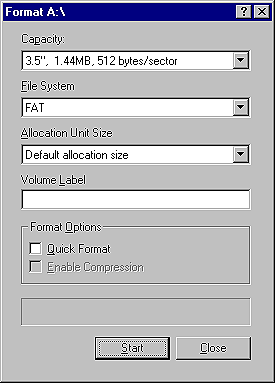
When you call SHFormatDrive, Windows will display the Format dialog. The exact dialog you get depends on whether you're running Windows 95 or Windows NT. Figure A shows the Format dialog as it appears under Windows NT 4.
Figure A: Windows displays the Format dialog when you call SHFormatDrive.
Now, let's look at what you need to do to call SHFormatDrive in your C++Builder programs.
#define SHFMT_ID_DEFAULT   0xFFFF

#define SHFMT_OPT_QUICK    0x0000
#define SHFMT_OPT_FULL     0x0001
#define SHFMT_OPT_SYSONLY  0x0002

#define SHFMT_ERROR    0xFFFFFFFFL
#define SHFMT_CANCEL   0xFFFFFFFEL
#define SHFMT_NOFORMAT 0xFFFFFFFDL

extern "C"
DWORD WINAPI SHFormatDrive(HWND hwnd,
                           UINT drive,
                           UINT fmtID,
                           UINT options);
Let's take a moment to discuss the constants, then we'll go over the function
declaration. First, the SHFMT_ID_DEFAULT constant is a special value that's
passed for the fmtID parameter of SHFormatDrive--at this time, the only valid
value that can be passed for the fmtID parameter.The next group of constants (SHFMT_OPT_QUICK, SHFMT_OPT_FULL, and SHFMT_OPT_SYSONLY) are flags that determine which format options are selected when the Format dialog is initially displayed. If SHFMT_OPT_QUICK is specified, then the Quick Format check box on the Format dialog will be checked when the dialog is displayed. If you specify SHFMT_OPT_FULL, then the Quick Format box is cleared. However, if you specify the SHFMT_OPT_SYSONLY flag, then the Copy System Files option will be checked when the Format dialog is displayed.
Note that this option applies only to Windows 95. If you attempt to specify SHFMT_OPT_SYSONLY under Windows NT, the call to SHFormatDrive will fail. These flags only determine which options on the Format dialog are selected. The user can always change the options before formatting the disk.
You'll use the SHFMT_ERROR, SHFMT_CANCEL, and SHFMT_NOFORMAT constants to check the return value of SHFormatDrive for errors. We'll discuss the return value of SHFormatDrive in just a moment.
DWORD WINAPI SHFormatDrive(HWND hwnd,
                           UINT drive,
                           UINT fmtID,
                           UINT options);
The hwnd parameter specifies the window handle of the window that should act as
the parent for the Format dialog. For C++Builder VCL applications, you should
use your form's Handle property here. You'd use the drive parameter to
specify the drive to format. The A drive is drive 0, the B drive is drive 1,
and so on. Attempting to set the drive number to an invalid drive number or to
any hard drive will result in an error. The fmtID parameter isn't fully
implemented and must be set to SHFMT_ID_DEFAULT. As discussed earlier, you'll
use the options parameter to tell Windows which options on the Format dialog
should be set when the dialog is displayed.Let's say you wanted to format the A drive and prompt the user to do a full format. In that case, the call to SHFormatDrive would look like this:
SHFormatDrive(Handle,
  0, SHFMT_ID_DEFAULT, SHFMT_OPT_FULL);
The process is really pretty simple once you've declared SHFormatDrive and its constants. This example ignores the return value since we haven't discussed the return value yet. We'll look at that next.
The error code returned is usually either SHFMT_ERROR or SHFMT_CANCEL. The SHFMT_ERROR code occurs if an error occurs when formatting a disk. Such an error might occur if the disk in the drive is bad, if the user removes the disk from the drive during the format, if the disk type is wrong (attempting to format a 720K disk in the 1.44 format), or for any number of other reasons.
SHFormatDrive returns SHFMT_CANCEL if the user cancels the format operation. The SHFMT_NOFORMAT code is returned if the disk in the drive can't be formatted. Although it's theoretically possible to get an error code of SHFMT_NOFORMAT, I've yet to see that error code in practice.
Windows NT handles SHFormatDrive differently. The return value is 0 if the function succeeded or SHFMT_ERROR if the disk wasn't formatted. Put another way, NT doesn't differentiate between the user canceling the format or an error occurring. In either case, SHFormatDrive will return SHFMT_ERROR under Windows NT.
Naturally, you should check the return value of SHFormatDrive. Then, take appropriate action if the disk in the drive remains unformatted.
Listing A: FMTDRIVE.CPP
//--------------------------------------------
#include <vcl.h>
#pragma hdrstop

#define SHFMT_ID_DEFAULT   0xFFFF

#define SHFMT_OPT_QUICK    0x0000
#define SHFMT_OPT_FULL     0x0001
#define SHFMT_OPT_SYSONLY  0x0002

#define SHFMT_ERROR    0xFFFFFFFFL
#define SHFMT_CANCEL   0xFFFFFFFEL
#define SHFMT_NOFORMAT 0xFFFFFFFDL

extern "C" DWORD WINAPI
SHFormatDrive(HWND, UINT, UINT, UINT);

#include "FormatU.h"
//--------------------------------------------
#pragma resource "*.dfm"
TForm1 *Form1;
//--------------------------------------------
__fastcall TForm1::TForm1(TComponent* Owner)
  : TForm(Owner)
{
}
//---------------------------------------------
void __fastcall
TForm1::Button1Click(TObject *Sender)
{
  int Res = SHFormatDrive(Handle,
    0, SHFMT_ID_DEFAULT, SHFMT_OPT_FULL);
  if (Res < 0) {
    String S;
    switch (Res) {
      case SHFMT_ERROR : {
        S = "Error formatting disk.";
        break;
      }
      case SHFMT_CANCEL : {
        S = "Format cancelled.";
        break;
      }
      case SHFMT_NOFORMAT :
        S = "This disk cannot be formatted.";
    }
    MessageBox(Handle, S.c_str(),
      "Error", MB_ICONEXCLAMATION);
  }
  else
    MessageBox(
      Handle, "Disk formatted successfully!",
      "My Application", MB_OK);
}