You can download sample files from our Web site as part of the file jan99.zip. Visit www.zdjournals.com/cpb and click on the Source Code hyperlink.
Almost every program that goes into production will eventually exist in multiple versions. And, unless the application resides on a single computer, multiple versions will exist at the same time. Multiple versions of the same application create support problems--not the least of which is simply determining which version of the application is running on a particular computer. Suppose you're supporting insurance systems, and the users already have an auto-insurance application. Now you're rolling out a home-insurance application that shares some elements with the auto-insurance program. For example, the original system configuration program that shipped with the auto-insurance application has been upgraded so that it can configure both the auto- and home-insurance applications.
If someone re-installs the auto-insurance application, you don't want the old configuration program to be installed on top of the new one. (You'd be getting support calls about the home-insurance program not working.)
Windows lets you store program version information in an application's resource data. An installation procedure can call Windows API functions to extract the version of an existing file and compare this with the version of the new file.
Another version issue occurs when a user calls for support. The first thing a support person needs to know is the version of the application the caller is using. Traditionally, the application version is displayed on an About dialog box accessible through the Help menu.
If you're building a C++Builder application, you don't want to store the current version in both the application's resource data and in a label control on the About dialog box. If you have to keep two copies of the same information they'll invariably get out of synchronization. The solution for this problem is a VCL custom control that automatically updates a label control with information from the application's version resources. In this article, we'll show you how to create such a component. (For some background on accessing version information, see "Working with version information".)
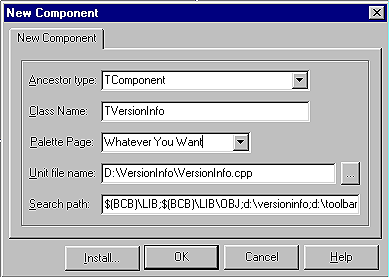
Figure A: Create the TVersionInfo class.
Listing A: The TVersionInfo class definition, versioninfo.h
#ifndef VersionInfoH
#define VersionInfoH
#include <SysUtils.hpp>
#include <Controls.hpp>
#include <Classes.hpp>
#include <Forms.hpp>
#include <StdCtrls.hpp>
//--------------------------------------------------
class PACKAGE TVersionInfo : public TComponent
{
private:
  String file_version ;
  TLabel *file_version_label ;

void __fastcall TVersionInfo::SetFileVersionLabel (
                                    TLabel *label)
  {
    if (ComponentState.Contains (csDesigning))
      label->Caption = "#File Version#" ;
    else
     label->Caption = file_version ;
    file_version_label = label ;
    return ;
  }
protected:
  virtual void __fastcall Notification(
                              TComponent *AComponent,
                              TOperation Operation) ;
  virtual void __fastcall Loaded () ;
public:
  __fastcall TVersionInfo(TComponent* Owner);

 __property String FileVersion = { read = file_version } ;
__published:
  __property TLabel *FileVersionLabel =
                            {
                              read = file_version_label,
                              write = SetFileVersionLabel
                            } ;
};
//-------------------------------------------------------
#endif
The only reason for using a function to write to the FileVersion property is that the label's caption will be updated when it's linked to the TVersionInfo control. At design time, the label is updated with the string #File Version#; at runtime it gets the actual version stored in the file. Using a constant string at design time avoids confusing the user. At design time, the control reads the version information for the C++Builder IDE rather than for the application.
Listing B: The TVersionInfo class implementation, versioninfo.cpp
//----------------------------------------------------
#include <vcl.h>
#pragma hdrstop

#include "VersionInfo.h"
#pragma package(smart_init)
//-----------------------------------------------------
// ValidCtrCheck is used to assure that the components
// created do not have any pure virtual functions.
//

static inline void ValidCtrCheck(TVersionInfo *)
{
    new TVersionInfo(NULL);
}
//------------------------------------------------------
//
//  Description:
//
//    Class Constructor
//
__fastcall TVersionInfo::TVersionInfo(TComponent* Owner)
    : TComponent(Owner)
{
   file_version_label = NULL ;

   DWORD handle ; // Dummy, Windows does not use
                  // this parameter.
   DWORD size = GetFileVersionInfoSize (
                   Application->ExeName.c_str (),
                   &handle) ;
   if (size == 0)
     return ; // No file information

   char *buffer = new char [size] ;

   bool status = GetFileVersionInfo (
                     Application->ExeName.c_str (),
                     0, // Unused Parameter
                     size,
                     buffer) ;
   if (! status)
   {
     delete [] buffer ;
     return ;
   }

   // Extract the language ID
   UINT datasize ;
   struct
   {
     unsigned short language ;
     unsigned short character_set ;
   } *translation ;
   status = VerQueryValue(
                       buffer,
                       "\\VarFileInfo\\Translation",
                       (void **) &translation,
                       &datasize) ;

  String key
    = "\\StringFileInfo\\"
    + String::IntToHex (translation [0].language, 4)
    + String::IntToHex (translation [0].character_set, 4)
    + "\\FileVersion" ;
  char *data ;
  status = VerQueryValue(
                       buffer,
                       key.c_str (),
                       (void **) &data,
                       &datasize) ;
  if (status)
    file_version = data ;
  else
    file_version = "" ;
  delete [] buffer ;
  return ;
}

void __fastcall TVersionInfo::Notification(
                                 TComponent *AComponent,
                                 TOperation Operation)
{
  // We don't care about controls being added.
  if (Operation != opRemove)
    return ;

  if (AComponent == file_version_label)
    file_version_label = NULL ;
  return ;
}

void __fastcall TVersionInfo::Loaded ()
{
  if (file_version_label != NULL)
    file_version_label->Caption = file_version ;
  return ;
}

//----------------------------------------------------
namespace Versioninfo
{
    void __fastcall PACKAGE Register()
    {
        TComponentClass classes[1] =
          {__classid(TVersionInfo)};
        RegisterComponents(
          "Whatever You Want", classes, 0);
    }
}
Loaded() is a virtual function that VCL calls after all the components have been loaded. You use this function to update the TLabel control referenced by the FileVersionLabel property with the file version string, because you know that when Loaded() is called, the label will be ready for updating.
The other virtual function used in this component is Notification(). VCL calls this function when a control is added to or removed from a form. Suppose you add a label control to a form and then assign the label a TVersionInfo control's FileVersionLabel property. If you then delete the label, the FileVersionLabel property would contain an invalid value. The Notification() function lets the component determine whether a component it's referencing is becoming invalid. If the TVersionInfo control references a TLabel control that's no longer valid, the Notification() function deletes the reference.
Figure B: Create a new package using the New Package dialog box.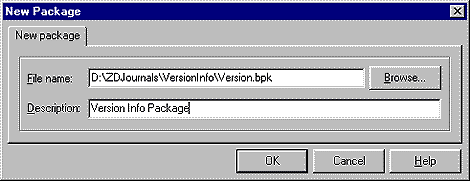
Next, you need to add the component to the package. Select Project | Add To Project and fill in the Add dialog box, as shown in Figure C.
Figure C: Add the component to the package.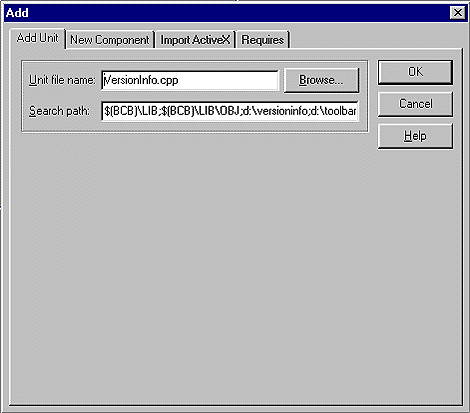
Now, rebuild your package. Then, select Component | Install Packages from the main menu and add your package to the list of installed packages. When you're finished, the TVersionInfo control should appear on the component palette, as shown in Figure D.
Figure D: The TVersionInfo component appears on the component palette.
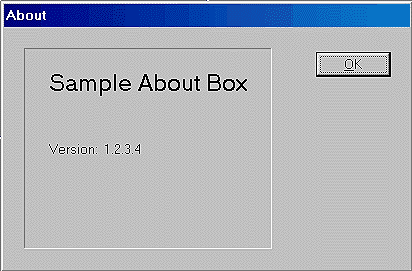
Try creating a new project. Add a TVersionInfo control and a TLabel control to the main form. Go to the object inspector and assign the label control to the FileVersionLabel property and then run the program. The results appear in Figure E. Go back and select Project | Options and update the version information; then run the program again and see what happens.
Figure E: The project displays version information like this.