You can download sample files from our Web site as part of the file jan99.zip. Visit www.zdjournals.com/cpb and click on the Source Code hyperlink.
The VCL class TStrings is a powerful class with many features you may not be aware of. One such feature is the CommaText property. Using the CommaText property, you can convert the text in a TString object from plain text to comma-separated text and back again to plain text. In this article, we'll show you how.
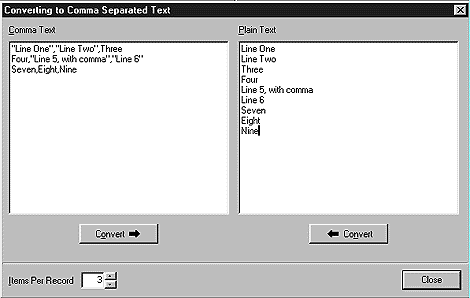
Figure A: Our example program displays plain text and comma-separated text.
Listing A: Function to convert text to comma-separated text
void ConvertToCommaSep(TStrings *source,
   TStrings *dest, int itemsPerRecord)
   {
   if ((source->Count % itemsPerRecord) != 0)
      throw EConvertError(
             "Wrong number of items per record");

   int recordCount = source->Count /
      itemsPerRecord;

   TStringList *temp = new TStringList;
   for (int i = 0; i < recordCount; i++)
      {
      for (int j = 0; j < itemsPerRecord; j++)
      temp->Add(source->Strings[i *
      itemsPerRecord + j]);

      dest->Add(temp->CommaText);
      temp->Clear();
      }

   delete temp;
   }
Listing B: Function to convert back from comma-separated text
void ConvertFromCommaSep(Tstrings
   *source, TStrings *dest)
   {
   dest->CommaText = source->Text;
   }
Both functions take arguments for two pointers to objects derived from TStrings. These pointers point to a source and destination for the conversion. ConvertToCommSep() also takes an argument--itemsPerRecord--that specifies the number of items to put on each line (record) of comma-separated text.
ConvertFromCommaSep() really requires no explanation. It derives all its functionality from the CommaText property of TStrings.
ConvertToCommaSep() is only slightly more complicated. ConvertToCommaSep() first checks to see if the number of items to be converted is a multiple of itemsPerRecord. If it isn't, an exception is thrown. Next, ConvertToCommaSep() creates a temporary TStringList object to use while building records with the correct number of items.
ConvertToCommaSep() iterates through the source text, adding itemsPerRecord items to the temporary TStringList. Once a record contains the correct number of items, it's added to the destination TStrings object using the CommaText property of the temporary TStringList. This is the point at which the actual conversion takes place. Listing C shows how easily we use these two functions in our example application to perform the conversion in either direction.
Listing C: Using the conversion functions
void __fastcall TMainForm::ConvertFromButtonClick(
   TObject *Sender)
   {
   ConvertFromCommaSep(Memo1->Lines,
      Memo2->Lines);
   }

void __fastcall TMainForm::ConverToButtonClick(
   TObject *Sender)
   {
   Memo1->Lines->Clear();

   ConvertToCommaSep(Memo2->Lines, Memo1->Lines,
      IPREdit->Lines->Text.ToInt());
   }