C++Builder offers many tools for organizing database applications. Some of these are unique, and using them effectively requires an understanding that, unfortunately, usually takes several implementations to develop. A certain amount of trial and error is required to find what works and what doesn't. This process can leave your system littered with examples of poor component use, component naming, and programming logic that you typically don't take the time to clean up later. This article will help you jumpstart your database development by showing you how to apply good data implementation practices at the start.
To fully understand this article you should know C++Builder database basics, know about data modules in general terms, and be familiar with TTable, TQuery, TDatabase and TField objects.
The design goals of a good data implementation include:
I. Keeping the implementation as similar as possible to the database design to make it easier to verify the implementation and to simplify development and maintenance.
II. Grouping related data components to help developers reuse the implementation.
III. Organizing the implementation for future extension and enhancement to allow adaptation to changing requirements.
IV. Making the implementation Database Management System (DBMS) independent to allow the application to scale between more and less powerful database systems.
V. Keeping the implementation independent of the user interface so other forms and applications can use it.
VI. Making component names clear and direct so program logic will be readable and comprehensible, thereby aiding maintenance and enhancement.
VII. Creating an efficient data implementation to ensure good performance at all scales.
C++Builder offers many tools and components to attain these goals. Those tools include:
I. Data modules: A specialized form that is the typical home of data components.
II. Data components: Provide DBMS-independent views into database tables.
III. Data-aware user interface components: Linked to a TDataSource, they are outside the data module and the data module is independent of them.
IV. Event handlers: The homes of programming logic to filter rows, set default values, enforce constraints, and propagate updates.
V. Persistent fields: Data fields, lookup fields, and calculated fields display and/or allow editing of physical and calculated data, and can also have event handling logic trigged by changes to their data values.
VI.BDE aliases: DBMS-independent references to databases.
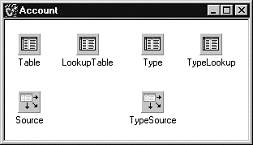
Databases are often designed using Computer-Aided Software Engineering (CASE) tools. These tools support one or more object-oriented models such as Chen Entity-Relationship (ER) or Booch notation. Whether you use ER diagrams or Booch notation, the end result is a set of fundamental data objects and their interconnections. An ER diagram, for example, shows objects as entities connected by relationships. An entity represents a database table, and the connections between the entities are joins, lookup fields, or calculated fields based on foreign keys. In a C++Builder implementation, a data module represents an entity and is named according to the entity’s purpose ("Account", for example). Each data module should have a primary table and a lookup table. The primary table, naturally, represents the core data for the entity. The lookup table is used for lookup fields and to perform other lookup needs from within or outside the data module. The data module also usually needs a table to explain and provide descriptive text for each coded field used by the entity. These tables, such as "Product" or "Status", are sometimes referred to as the domain from which the field values are drawn. A lookup table ("TypeLookup", "StatusLookup", etc.) may also be needed to support lookup fields in the primary table. Figure A shows a data module for an entity that represents a customer account.
Figure A
Data modules represent the database design in the implementation.
The primary and domain tables are typically linked to the user interface for editing. The tables are linked to the user interface through data sources. They usually have event handlers (AfterPost, BeforeDelete, and so on) to support referential integrity. Lookup tables may be used in the user interface, but for display or selection only.
Figure B shows how the database design and data module correspond.
Figure B
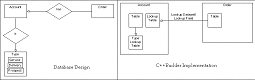
Database design and the data module directly correspond to one another.
The data module acts as a boundary for the implementation. It takes a special act to bring things across that boundary, which gives you the opportunity to ask, "Should this be brought in from another data module, or should it be in this data module?"
Remember that one of the goals of better database design is reuse. Considering that, you should never access the user interface (i.e. a control) from the data module itself. Referencing a user interface element from a data module essentially makes it impossible to reuse the data module with any other user interface. If you are tempted to do this, create your own data-aware control instead.
A well-designed structure with good clean component names aids in having a clean notation. For example, if you have implemented a logical component naming convention you can use code like this:
S = Account->Type->
  FieldByName("DESCRIPTION")->AsString;
This helps keep you thinking of data components in an object-oriented fashion.
In the bad old days, the application knew the physical layout of the data on disk. A little later, the first level of independence was born when the only thing developers needed to know was the layout of the file. Next came the database schema and the DBMS, which let the developer avoid knowing the file layout of the data, and which provided SQL and/or an API to access the database content.
With C++Builder, there is an additional layer between the developer and the data—the Borland Database Engine (BDE). The BDE uses aliases to provide access to a database. An alias describes the DBMS type (dBase, Paradox, SQL Server, and so on) and location (a database connection or a directory). The BDE is the only part of the system that knows the actual location and type of a database. The alias is then used by VCL data access components such as TTable and TQuery. In this way, the C++Builder program does not even need to know about the DBMS or even the specifics of the alias. It only needs to know the name of the TTable or TQuery component used to access the database. Figure C shows the relationship between the VCL data access components, the BDE, and the DBMS.
Figure C
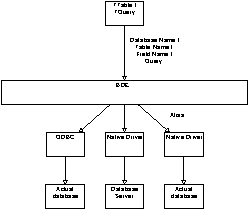
The BDE is the link between the user program and the DBMS.
The BDE also offers an amazing capability—the heterogeneous join. A heterogeneous join allows a SQL SELECT statement to join tables across DBMS. For instance, a dBase table can be joined to a Sybase table simply by properly specifying the alias. This feature allows you to work with legacy applications or foreign databases as if they were a natural part of your system.
Why is all this abstraction good for the developer? If done right, a C++Builder program can scale from a simple desktop DBMS like dBase or Paradox all the way to large client/server databases like Sybase and Oracle without any programming changes.
Attaining DBMS independence requires some simple discipline on your part. By following a few simple rules when you design your application you can attain DBMS-independence from the start:
I. Whatever DBMS you use, keep table and field names at the lowest common denominator. Use 8.3 uppercase table and database file names, and 15 character upper case field names without spaces, numbers, or special characters.
II. Establish separate BDE aliases for any tables that you may want to reside in separate locations (on the client vs. on the server, for example). This gives you flexibility in distributing your database.
III. Avoid references to database or table names in your code. Keep those names restricted to data components in the data module. If you must reference them in your code, use notation like Table->DatabaseName rather than "MyAlias." For maximum independence, place a TDatabase object in each data module for each alias, and instead of having tables refer to the alias, have them refer to the TDatabase object. A change to each of these TDatabase objects automatically alters the database used by the tables and queries.
IV. Use persistent fields. See the side bar entitled Using persistent fields for more information on persistent fields.
With this strategy, you have a very clear data implementation which is separated from the user interface and from other data modules, is highly reusable, is tightly related to the database design, is efficient, and which provides clean notation for your program code. What more could you want?
Designing a database with these features in mind has several advantages, not the lease of which is the ability to easily move your application to a different DBMS. To retarget your data implementation to a new DBMS, all you should need to do is:
I. Create your tables in the new DBMS, using the same table and field names.
II. Retarget the alias to the new DBMS driver and database location.
III. Run your program.
If, for some reason, you are forced to change table names, you only have to change them in the referencing objects in the data module (tables and queries). Field names only have to be changed in the persistent field objects and in SQL statements.
Finally, you can use form inheritance to create variations based on a core data module. To extend the base data module’s functionality, you can add some fields, add tables, or override or supplement your TTable, TQuery or TField event handlers. The possibilities are endless, and largely unexplored. Try something new!