Database applications come in many shapes and sizes. Some are as simple as a mailing list utilizing just a single table. Others are monolithic client/server applications that contain dozens of tables, views, triggers, and stored procedures.
Most C++Builder database programmers are familiar with the data access components such as TTable, TQuery, and TDataSource. Many, however, have never used the TDatabase component in their applications. One reason many users don’t use TDatabase is that database applications are not required to explicitly use a TDatabase. If no TDatabase is specified for the application, the VCL uses a temporary TDatabase with default values.
The TDatabase component provides these primary features:
I. The ability to quickly switch between databases during development
II. Database login control
III. Transaction control
IV. Database connection control
This article will explain the advantages of these TDatabase features and how to implement them in your applications.
Before I explain how TDatabase can be used to switch between databases, let me explain now TDatabase is used with other data access components. First you drop a TDatabase on your form and set the AliasName property to an existing BDE alias. Next, you provide a name for the DatabaseName property. The name can be any name you choose. I typically use something like "MainDB." Next, you set the DatabaseName property of all your data access components (TTable, TQuery, TStoredProc, etc.) to the name you gave the TDatabase’s DatabaseName property. Now all your data access components go through the TDatabase rather than going directly to the BDE.
Now consider a situation where you have developed a database application for in-house use and have deployed that application. Development is, of course, a never-ending task. Therefore, you will probably continue to work on the application. You probably don’t want to develop and test against the live database. Instead, you would likely work with a "test" database. You would have one BDE alias for the live database and another alias for the test database. Provided that you have properly set up all your data access components to go through the TDatabase component, switching between the live database and the test database is as simple as changing the AliasName property of the TDatabase. This makes it very easy to safely continue development of your application without putting the live database at risk. The next time you deploy your application, you simply change the TDatabase alias name back to the alias for the live database and recompile.
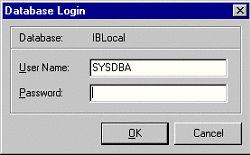
Flat-file databases—such as those using Paradox or dBase tables—don’t require a user name or password in order to access the database. Full-scale client/server databases, however, generally require a user name and password in order to connect to the server. If your application uses the default TDatabase object, the BDE will pop up a dialog the first time you attempt to connect to the database, as shown in Figure A.
Figure A
The default database login dialog is shown when you attempt to connect to a client/server database.
For some applications the default login dialog will suffice. Other applications require a specialized login dialog or may not wish to show a login dialog at all. For those applications, a TDatabase component is needed in order to control login.
Login control is facilitated in one of two ways. One way is via the TDatabase component editor. If you aren’t concerned about security you can simply double-click the TDatabase component on your form to invoke the component editor. The component editor is shown in Figure B. Uncheck the Login prompt check box and you will never again see a login prompt. This is especially convenient during development, although I wouldn’t necessarily recommend it for your release builds.
Figure B
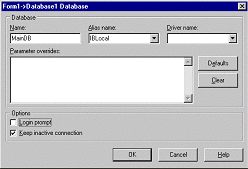
The TDatabase component editor allows you to set login and connection parameters.
The other way to control login is via the TDatabase's OnLogin event. The event handler for the OnLogin event includes a parameter called LoginParams. LoginParams is a TStringList that expects information structured as follows:
USERNAME=SYSDBA
PASSWORD=masterkey
Given that, the OnLogin event handler used to log into Local Interbase would look like this:
void __fastcall TForm1::Database1Login(
  TDatabase *Database,
  TStrings *LoginParams)
{
  LoginParams->Values["UserName"]
    = "SYSDBA";
  LoginParams->Values["Password"]
    = "masterkey";
}
The OnLogin event gives you the opportunity to create your own login dialog or to extract login information from some other source, such as the Registry.
Keep in mind that OnLogin will be fired every time your application needs to connect to the database server. Obviously this will happen the first time your application needs to access the database. It will also occur if the connection to the server was dropped for any reason. I’ll address persistent connections in the section, "Database connection control." The point is that when using non-persistent connections, login can occur more frequently than you expect and you should be prepared to respond to the OnLogin event at any time.
The BDE provides support for database transactions. A transaction may consist of a single update to the database or may consist of multiple updates. The advantages to transactions are:
I. All actions against the database are applied at one time
II. Connection or hardware problems don’t result in lost data
III. Control over database access in multi-user environments
IV. Transactions can be committed (applied) or rolled back (canceled)
V. Reduced network traffic
Transactions are initiated with the StartTransaction() method, followed by one or more database actions such as running a query or updating a table. To apply the actions, call the Commit() method. To cancel the actions, call the Rollback() method. For example:
Database1->StartTransaction();
try {
  Query1->Open();
}
catch (EDBEngineError&) {
  // handle the exception
  Database1->Rollback();
  return;
}
Database1->Commit();
Naturally, this is only a simple example. Transaction control is a subject that requires a full article to cover adequately. It is important to understand, though, that once you have started a transaction you must call either Commit() or Rollback() to end the transaction. If you fail to call one of these functions, an exception will be raised the next time you attempt to access the database.
As with much of the VCL, you aren’t required to use transactions. If you do not explicitly create a transaction the VCL will create a temporary transaction on your behalf. Be aware, though, that the VCL will create a transaction for each and every database action, resulting in more network traffic and higher load on the database server.
The connection to the database server is controlled through TDatabase’s KeepConnection property. If KeepConnection is true then the database connection is maintained regardless of what happens within the application (barring catastrophic events, that is). If KeepConnection is false, the database connection state is handled by the BDE. The BDE will establish a connection when the application accesses the database and will close that connection when there are no active datasets. Keep in mind that the BDE must log onto the database server each time a connection is required. The process of logging onto the server takes time so if your application accesses the database frequently you will probably want to set KeepConnection to true. For full connection control, set KeepConnected to false and call the Open() and Close() methods as needed. Alternatively you can modify the Connected property to open and close the connection.
TDatabase is a very useful component and it pays to be familiar with its features. I particularly like the feature that allows me to switch between databases with just a few mouse clicks. Another major feature of TDatabase is transaction control. Any serious client/server application will likely use transactions. If you haven’t yet experimented with TDatabase I encourage you to spend some time investigating this component.