I am going to show you two functions that I use in nearly every program I write. Two functions that are never included in any program I distribute. Well, actually, the two functions are really different, over-loaded version of one function, UnderConstruction().
These two functions will display a message box telling you that something in your program—usually event code—is incomplete. They will also make an attempt to tell you what object called them.
When you add a component such as a TButton, TMenuItem or TAction to a VCL project, you need to provide code for an event of that component before it becomes useful. Normally, you would write code for the OnClick() event of TButton and TMenuItem and for the OnExecute() event of TAction.
I find that when I start to design and lay out a form or menu, I already know what buttons and menu items I want to use and I know the names of the event functions I want to associate with these. However, I don’t necessarily want to stop and write all the code required to make each of these event functions operational.
I could just leave the event code out and go back and fill it in later. However, there are two problems with this approach.
First, when testing a program that is under construction, menu items, buttons etc. that have no code attached will just do nothing when selected. They may also appear to do nothing even if they have events coded. How do you tell the difference? Using the UnderConstruction() functions, you know instantly that this event is not working, because the code has not been completed.
Second, when using a control associated with a TAction item, (e.g. a TmenuItem), the control will be disabled if there is no event code for the OnExecute() event of TAction. Again, it is difficult to tell if a control is disabled because there is no event code or for some other reason. The UnderConstruction() function enables the item and lets you know that the code is incomplete.
Listings A and B contain the source code for the UnderConstruction() functions. The first version of UnderConstruction() takes a pointer to a TObject as a required parameter and an optional argument of an AnsiString. It tries to identify the object by casting it to a TControl and reading the Name property of the TControl. It tries to further identify any TAction, TButton, or TMenuItem by reading that controls Caption property. If the optional AnsiString parameter was used, UnderConstruction() appends this string to the control’s identification string and calls the second version of UnderConstruction() with the identification string as its argument.
The second version of UnderConstruction() displays a message box with its AnsiString string argument as the bulk of the text in the message box.
Let’s say we’re designing a form, TMainForm, for a new project. We add a menu item named "ConvertItem" with the caption "Convert File". If we generate the OnClick() event code for the item, we will get the empty shell for a function named ConvertItemClick(). However, some one else is writing the code for this event. So, let’s use the UnderConstruction() functions as a placeholder. Here’s what the event code will look like:
void __fastcall TMainForm::
  ConvertItemClick(TObject *Sender)
{
  UnderConstruction(Sender);
}
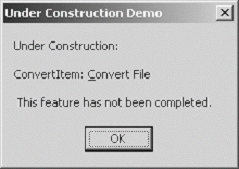
When this menu item is selected, the message box shows in Figure A will be displayed.
Figure A
Under Construction message box
Let’s use the optional string parameter of UnderConstruction() to provide even more information:
void __fastcall TMainForm::
  ConvertItemClick(TObject *Sender)
{
  UnderConstruction(Sender,
    "Bill is working on this code");
}
This code will produce the message box shown in Figure B when the menu item is selected.
Figure B
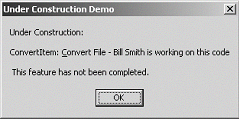
Under Construction message box using additional AnsiString parameter
Obviously, the UnderConstruction() functions should only be used during debugging and testing—while your program is under construction. That’s why I say that I use them in every program I write but they are not included in any program I distribute (except, of course, for the demo program for this article). The program can be found on the Bridges Publishing Web site.
For these functions to work, you must first define the macro _UNDERCONSTRUCTION. The best place to do this is in the Conditional Defines setting of the Directories/Conditionals tab of the Project Options dialog. When this macro is defined, the UnderConstruction() functions work as described in this article. Before you do the final build of your project, remove the _UNDERCONSTRUCTION macro definition. If you have accidentally left a call to UnderConstruction() in your code, you will get a compiler error.
You could add code to the first version of UnderConstruction() to provide information for more types of VCL objects. For instance, it might be useful to include code to provide the name of the TDataSet in events such as BeforePost(). However, I’ve found UnderConstruction() to be a very useful function just as it’s written.
Listing A: UnderConstruction.h
#ifndef UnderConstructionH
#define UnderConstructionH

#ifdef _UNDERCONSTRUCTION

void __fastcall UnderConstruction(
  TObject *Sender, const String &msg = "");

void __fastcall UnderConstruction(
  const String &feature = "");

#endif   // _UNDERCONSTRUCTION

#endif   // UnderConstructionH
Listing B: UnderConstruction.cpp
#ifdef _UNDERCONSTRUCTION

#include <vcl.h>
#pragma hdrstop

#include "UnderConstruction.h"

void __fastcall UnderConstruction(
  TObject *Sender, const String &msg)
{
  String feature;

  TComponent *component =
    dynamic_cast<TComponent *>(Sender);
  if (component != 0)
    feature += component->Name;

  TAction *action =
    dynamic_cast<TAction *>(Sender);
  if (action)
    feature += ": " + action->Caption;

  TMenuItem *item =
    dynamic_cast<TMenuItem *>(Sender);
  if (item)
    feature += ": " + item->Caption;

  TButton *button =
    dynamic_cast<TButton *>(Sender);
  if (button)
    feature += ": " + button->Caption;

  if (msg.IsEmpty() == false)
    feature += " - " + msg;

  UnderConstruction(feature);
}

void __fastcall UnderConstruction(
   const String &feature)
{
  String msg = "Under Construction:";
  if (feature.IsEmpty() == false)
    msg += "\r\n\r\n" + feature;
  msg += "\r\n\r\n This feature has "
    "not been completed.";

  ShowMessage(msg);
}

#pragma package(smart_init)

#endif   // _UNDERCONSTRUCTION