Stefan, who is studying at Technische Universitat Munchen in Germany, can be contacted at 100042.1003@compuserve.com. Scot, a cofounder of Stingray Software, can be contacted at ScotWi@aol.com.
A wide variety of off-the-shelf VBX/OLE/DLL components are available to simplify development with C++ and MFC. However, function-based interfaces do not give you the object-oriented benefits of a C++ interface. Simply wrapping a C++ class around a DLL is not sufficient, since you can't modify component behavior through inheritance.
In this article, we'll describe the design and implementation hurdles we encountered when extending existing MFC classes to take advantage of the object-oriented paradigm. The component we developed was a grid control--a user-interface component that displays data in rows and columns, allowing end users to manipulate data. In all, the grid component ended up being about 45,000 lines of C++ code.
Since we'll focus on design principles, we won't provide the source code for the entire control, although we will present a class or two for illustrative purposes. (The grid control itself is commercially available.) Our intent is to document our hard-won experience so that you can use and benefit from the same C++/MFC principles in your applications.
Our primary design goal for the grid component was to be 100 percent MFC compatible. This meant we had to carefully consider how others might derive classes from ours. It was also important to use standard MFC approaches such as the document/view architecture whenever possible. More specifically, we wanted to:
From the developer's perspective, each worksheet is an instance of a grid class, which maintains information about the currently active cell and handles resizing and other window-management functions. Multiple worksheets are handled by placing several grids within a tabbed window. There are classes for each different type of cell, including text entry, buttons, and bitmaps. To allow cells to have different visual attributes without storing separate attributes for every cell, we decided to have a separate set of classes for storing cell attributes. These classes implement a style hierarchy with default styles for each row and column, as well as the entire grid.
To support the use of the grid both as a view and a control in a dialog, we needed an MFC CWnd-based class (SECGridWnd) and a CView-based class (SECGridView). (Classes that start with C are MFC classes, and those prefixed with SEC are grid classes.) However, implementing each one separately would result in a lot of code duplication.
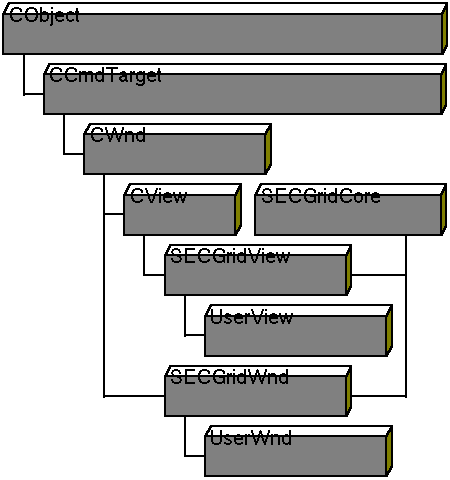
Since CView already inherits from CWnd, we considered having SECGridWnd inherit from CWnd, and SECGridView inherit both from CView and SECGridWnd. This would allow the common code to reside in SECGridWnd. Unfortunately, most classes in MFC--including CWnd and CView--derive from CObject. CObject is designed such that it can only appear once in a class hierarchy without causing serious collisions.
Our solution was to put the common code in the class SECGridCore, which does not inherit from CObject. Thus, SECGridView can inherit from both SECGridCore and CView without conflict. Figure 1 illustrates this approach, which we also used at several other points in the project.
Since SECGridCore is not derived from CWnd, it can't directly handle CWnd functionality, such as drawing operations and message maps. It must instead own a pointer to a CWnd object to handle drawing operations. Our classes inherit both from SECGridCore and a CWnd class, and set the SECGridCore member m_pGridWnd to this in the constructor. The derived class inherits the message map from CWnd and is responsible for calling the associated SECGridCore methods. Figure 2 shows how this works for SECGridView.
The SECGridCore class encapsulates all of the drawing logic for the grid and its components. It is responsible for drawing the grid, including inverting any selected cells. It handles scrolling and provides support for frozen rows and columns, which do not move when the rest of the grid scrolls. Finally, SECGridCore interprets user interactions, including formatting cells, inserting and moving rows, tracking the current cell, and managing undo and redo.
Class SECGridWnd provides SECGridCore with an interface so that it can be used like a control (placed in a dialog and manipulated with the Visual C++ dialog editor). Like CWnd, SECGridWnd is rarely instantiated. Instead, you derive a class from SECGridWnd, override the virtual functions to obtain the desired behavior, and instantiate the derivative. The SECGridView class provides CView features such as splitter-window support, printing, and print preview. Like SECGridWnd, it is also usually used only as a base class and not directly instantiated.
The SECStyle class contains all the information necessary for displaying a single cell. This includes the type of the cell, the cell contents, and attributes such as the text color, borders and control type, as well as font attributes. All of these styles can be modified by the end user via the SECStyleSheet dialog. You can extend SECStyle at run time with additional information about specific cells. For example, you could add an Expression attribute which could be modified with SECStyleSheet to add simple formula capabilities to the grid.
Base styles provide default attributes for a group of cells. The predefined base styles are row header, column header, and standard. Row-header cells inherit their attributes from row-header style, and column headers inherit from column-header style. Standard is the base style for all cells in the grid. These base styles are maintained by an SECStylesMap object and can be modified with an SECStylesDialog. These default styles are automatically applied to all appropriate cells that do not explicitly override them.
Because controls embedded in a grid have to interact closely with the grid, we created our own hierarchy of grid controls, using the same multiple-inheritance approach used for the basic classes. Figure 3 shows the hierarchy of the grid-control classes.
SECControl is an abstract base class that establishes a default grid-to-control interface that derived grid-control classes must implement. If deriving from SECControl only, controls must be entirely implemented by the derived class. However, SECControl can also inherit from existing MFC control classes to implement a standard MFC control derivative. The resulting MFC control derivative can be used in grid cells. For example, classes SECEditControl, SECComboBoxWnd, and SECListBox in Figure 3 are MFC control derivatives that use this approach.
ODBC is a call-level interface that lets applications access data in any database for which there is an ODBC driver. This allows your application to be independent of the database system.
MFC includes a high-level API for using ODBC. Two classes in this API are of interest here: CRecordset and CRecordView. A CRecordset object represents the currently selected records. It can scroll to other records, update records, sort the selection, and apply filters to qualify the selection. A CRecordView object provides a form view directly connected to a CRecordset object.
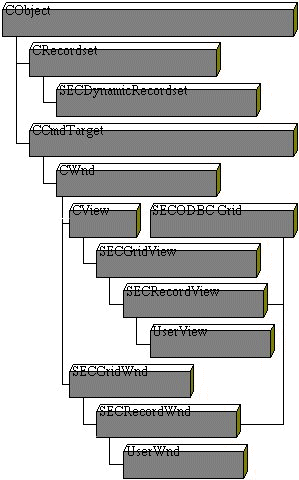
The MFC database classes do not directly support the ability to determine the structure (or schema) of the database at run time. However, we wanted to make it possible for the end user to specify and view the results of an SQL query even if the schema were unknown at compile time, while still allowing the developer to continue using ClassWizard to create record sets with a known schema. We handled this by allowing the grid classes to be bound to any CRecordSet-derived class and creating SECDynamicRecordset (our own descendant of CRecordset), which has the necessary functionality to determine the schema information at run time. We altered the RFX mechanism in SECDynamicRecordset to behave exactly like any other CRecordset class. Consequently, the grid ODBC classes integrate cleanly into the MFC architecture and allow you to specify SQL Query statements at run time.
Figure 4 shows the hierarchy of the ODBC grid classes. SECODrid provides the basic functionality to display the records of a CRecordset. Because SECODrid is not derived from CObject, it can be used as a right-hand branch in derived classes. This is the same mechanism we discussed with SECGridCore. The SECRecordWnd and SECRecordView classes inherit from SECODrid to display query results in a dialog or view grid, respectively. Additional classes are used to display the status beam in the scroll bar.
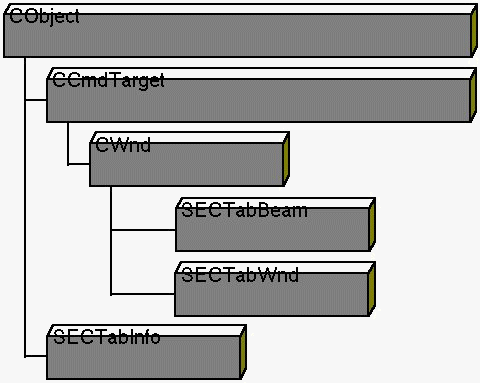
While MFC provides advanced UI components such as tabbed dialogs, splitter windows, and floating toolbars, there are no classes that directly support workbook (or tabbed window) interfaces. Consequently, we developed the SECTabWnd class to hold multiple instances of SECGridView, one for each tab; see Figure 5. In other words, each tab holds a different view. This is similar to the way MFC splitter windows (CSplitterWnd) operate.
The SECTabWnd class handles the containment and switching between the various views. Class SECTabBeam draws the tabs, while SECTabInfo stores the tabs' properties such as name, size, and the like. The end user can change the tab names by double clicking. The source for the tabbed window classes is available electronically (see "Availability," page 3).
Styles are the key to the display of the grid and also define most of its behavior. The SECGridCore member function ComposeStyleRowCol computes the style for a particular cell. ComposeStyleRowCol first calls GetStyleRowCol to get any cell-specific style attributes. It then fills in defaults from the row, the column, and finally from the entire grid. Listing One shows a simplified version of ComposeStyleRowCol.
GetStyleRowCol handles a single set of attributes. If either the row or column is 0, the corresponding row or column style is returned. GetStyleRowCol takes an argument specifying the operation to be performed on the style argument. The SECCopy operation copies the styles into the argument, while the SECApply argument alters only those style attributes that have not yet been set.
One function controls all access to styles, allowing the developer to bind (that is, dynamically tie) the grid to data such as a database or a live-data feed. To bind the grid to a data source, simply override the virtual GetStyleRowCol function.
Listing Two is an example GetStyleRowCol override that ties a grid control to a database stored in the document as member m_dbfile.
Centralizing all style operations in one virtual function lets you easily modify the grid at run time in any way imaginable.
What if you want the user to be able to dynamically modify the style? The grid provides StoreStyleRowCol, a virtual function that is called before data is stored. By overriding this function, you can intercept the end user's changes and do whatever you wish with them.
This technique allows you to enhance the grid. You can override many methods; for example, a virtual OnValidateCell function (called after the user has left a cell and before another cell is selected) can be overridden to perform cell-level validation.
When the grid draws, it first calculates the range of cells that need to be drawn. Then it creates a style object for each cell in the range and initializes those styles with ComposeStyleRowCol. Once all of the style information has been gathered, the grid draws the backgrounds and borders of each, then asks each cell control to draw itself.
To minimize the number of drawing operations, our drawing routine looks globally at all cells to determine the most cost-effective drawing technique. For example, all neighboring cells with the same background pattern and all cells with the same borders are grouped, so that these GDI operations need be called only once for that common group of cells. We also cached GDI objects such as pens, fonts, and brushes to avoid the overhead of allocating and freeing these resources for each cell. The cache is created at the start of the draw process and is flushed when all of the cells have been drawn.
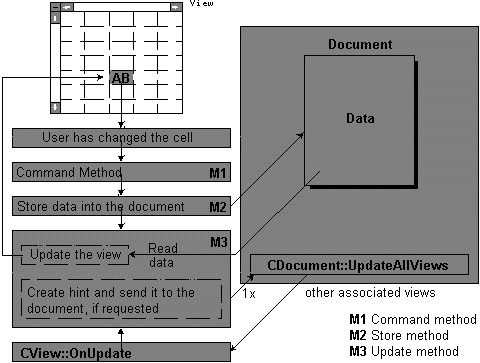
In addition to drawing in response to standard Windows paint messages, the grid also has to keep the document and views synchronized. The MFC document/view model handles most of the updating for the grid. To provide maximum flexibility, the grid provides three overridable functions in the update path. Figure 6 shows how updates are performed. You can intercept updates at the command stage, the storing stage, and even the update stage.
If you leverage the document/view architecture and ensure that you can override the functions involved in updating at every critical stage, the uses of the grid are limitless. For example, you could have two views on the same live-data feed--one with a read-only version of incoming data, and another with a delayed snapshot that can be modified by the user.
Each composed style object contains an identifier for a control. Like any other style attribute, this identifier can be changed at run time, allowing you maximum flexibility. The SECGridCore class maintains a map of registered control types and identifiers. In the SECGridCore::OnInitialUpdate member function, you can register any additional control types and identifiers by calling RegisterControl.
To reduce resource requirements and maintain high performance, we implemented a control-sharing scheme in which the grid creates only one control of each type and uses that single control to draw every cell of that type. When the grid is not in the process of drawing, it places a "live" control at the current cell, so that the user can interact directly with that control. When the user moves to a new cell, the grid resets the previous cell and places a "live" control at the new current cell.
This technique lets the control draw the current cell as the user moves around the grid, resulting in higher performance and very low overhead: An example is a grid full of edit controls for entering a table of values. The user will probably enter text and tab to the next cell very quickly. In this case, the grid-control implementation transparently uses the same edit control instead of creating and destroying a new edit control for each current cell or maintaining a unique edit control for each cell.
The compactness of our grid control can be attributed to solid object-oriented design practices and to our use of existing MFC architectures and classes whenever possible. Control caching and other optimization techniques make the grid fast without sacrificing the object-oriented interface or requiring special care.
void CGXGridCore::ComposeStyleRowCol(ROWCOL nRow, ROWCOL nCol, CGXStyle*pStyle)
{
  //Copy the cell style first
  GetStyleRowCol(nRow, nCol, *pStyle, secCopy);
  //Apply the row style next
  GetStyleRowCol(nRow,0,*pStyle,secApply);
  //Apply the colum style
  GetStyleRowCol(0,nCol,*pStyle,secApply);
  //Finally inherit any base styles
  pStyle->LoadBaseStyle(GetStylesMap());
}
BOOL CDBaseBrowserView::GetStyleRowCol(int nRow, int, nCol, SECStyle&
style, SEC_OPERATION op)
{
  if (nRow == 0) { // Column style
    style.SetStyle(GetField(nCol)->name); //Get column name from DB
    return TRUE;
  }
  //Advance row in DB (row = record)
  if (GetDocument()->m_dbfile.Seek(nRecord -1){
    //Row headings
    if (nCol == 0){
      char sz[20];
      wsprintf(sz,"%5lu%c",nRow,
               GetDocument()->m_dbfile.IsDeleted() ? '*' : ' ');
      style.SetValue(sz);
      return TRUE;
    }
    //If we get here, we're looking up a cell.
    CSting s;
    CField * fld = GetField(nCol);
    //Get cell data and store along with max length
    GetDocument->m_dbFile.GetValue(GetFieldId(nCol),s);style.SetValue(s);
    style.SetMaxLength(fld->len);
    // Now set up the cell appearance based on field typeswitch(fld->type){
        case 'N' : style.SetBaseStyle(SEC_NUMERIC); break;
        case 'C' : style.SetBaseStyle(SEC_TEXT); break;
        case 'D' : style.SetBaseStyle(SEC_DATE); break;
        case 'L' : style.SetBaseStyle(SEC_CURRENCY); break;
    // a sidenote:
    // this is also a good example for using base styles. The user can
    // change the appearance of all numeric, text, date and currency fields
    // at run time with the SECStyleSheet described above.
    // In OnInitialUpdate base styles are typicaly initialized
        // programmaticaly as for example:
    // BaseStyle(SEC_NUMERIC)
    //  .SetHorizontalAlignment(DT_LEFT)
    //  .SetFont(SECFont().SetBold(TRUE));
    }
    return TRUE;
  }
  return FALSE; //At end of DB
}