The Processor Expert™ plug-in is integrated into the Metrowerks CodeWarrior IDE
application. The CodeWarrior IDE menu contains a new menu item named "Processor
Expert". The Processor Expert plug-in generates code from the Embedded Beans and
the CodeWarrior manages the project files, compile and debug the application.
(see also chapter Quick Start
and in the Tutorial course)

How to create a new project
To create a new project for the Processor Expert™ plug-in,
select the "New" command in the "File" menu in the CodeWarrior Main menu. Select the "HC08 Stationary" item and
type your project name in the Project edit box in the opened dialog
window. You can also select desired location for the project. After
clicking the "OK" button, select the appropriate CPU in the
Processor Expert™ folder
as a project stationery
in the "New project" window. The new project will be created.
If no other project is already opened in the
Processor Expert™ plug-in, it runs the plug-in and the new
project template will be inserted to the plug-in environment.
More information how to start a new project can be found in
the chapter Quick Start
and in the Tutorial course.
Compiler and Linker settings
To set the compiler and linker options, select the command "{TargetName} Settings"
in the "Edit" menu in the Code Warrior main
menu. Items "Compiler for HC08" and "Linker for HC08" are in
the folder "Target". The command
"{TargetName} Settings" is not available when no project is opened.
Where
to find source code and user modules
The Processor Expert generates all drivers during the code
design process. The generated files are automatically inserted
into the active (default) target in the CodeWarrior's project.
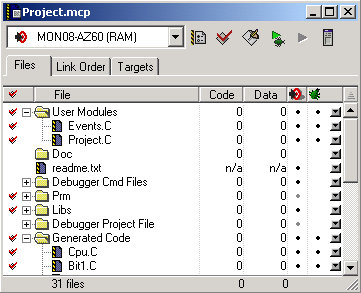
Generated files corresponding to the Embedded Beans can be
accessed in the "Generated Code" folder in the "Files" tab in
the Code Warrior project window. The other files, intended to
be modified by user, are generated into the "User modules"
folder in the "Files" tab in the Code Warrior project window.
User can also add his own specific source code files into this
folder. If the linker setting of the default target does not
match to the CPU in the Processor Expert™ project, user is
asked, whether to set automatically correct linker settings in
the default target or to create a new target with correct
linker settings. In the latter case the files will be
generated in the new target. (more information about the
CodeWarrior project panel can be found the CodeWarrior
documentation)
The following picture shows the CodeWarrior Project panel.